In early July, I noticed several websites in my RSS feed had started using Tencent EdgeOne. After looking into the service more closely the following week, I decided to try Tencent’s edge security and acceleration platform on my own blog.
There is one important footnote: I temporarily disabled EdgeOne on August 1. For reasons I still have not determined, the service appeared to cause my CPU usage to spike to 100% quite frequently after it was enabled.
What EdgeOne provides
EdgeOne uses Tencent’s global edge network to combine website acceleration with security protection. At the time of testing, an activation code could be used to obtain free acceleration with unlimited traffic and request counts, with no stated short-term expiration.
For a small personal site, the appeal is straightforward. Requests can be served through edge nodes closer to visitors, while malicious traffic and common attacks can be identified and blocked. It is a practical combination for site owners who want both better performance and an additional layer of protection without immediately paying for a commercial plan.
Activation and basic configuration
Free access requires an activation code. I found the code by watching the official announcements in Discord, where it was posted as an image. I used WeChat’s image-recognition feature to extract the text, then entered the code on Tencent Cloud’s EdgeOne redemption page.
The rest of the setup was relatively simple:
- Add the domain name in the EdgeOne console.
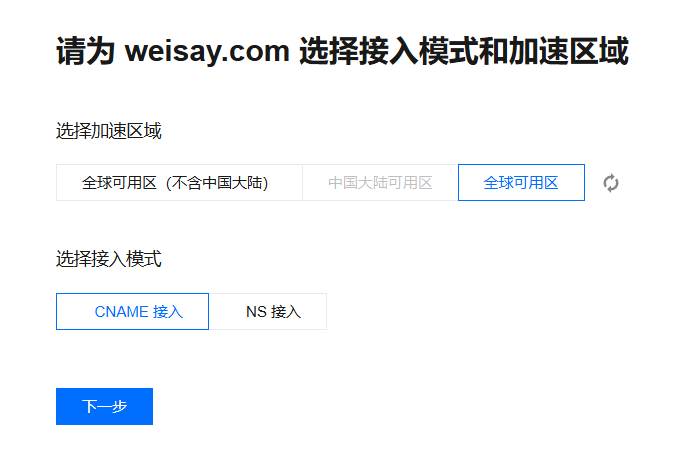
- Select the Global Available Area as the acceleration region.
- Point the domain to EdgeOne through a CNAME record.
- Configure the acceleration rules according to the origin server’s requirements.
EdgeOne also offers preset rule templates. Since this blog runs on WordPress, I selected the WordPress template rather than configuring every rule manually.
Enabling HTTPS
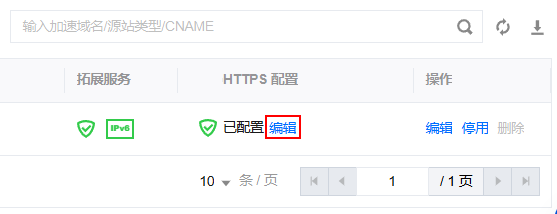
HTTPS is now essential for a modern website, and EdgeOne can issue a free certificate directly from its console. The certificate request is handled automatically, and the console indicates that it will renew the certificate before expiration.
That automatic renewal removes one routine maintenance task. Once the HTTPS and acceleration settings were in place, the remaining step was simply to wait for the CDN configuration to take effect.
Restoring the visitor’s real IP address
One common issue after putting a site behind a CDN is that the application may see the CDN node’s address instead of the visitor’s real IP. I noticed this when replying to comments: my own address was shown as Foshan, Guangdong, rather than my actual location.
Fortunately, there is an established solution for Nginx. A configuration guide available on GitHub explains how to obtain the real client IP from EdgeOne’s forwarded request information. After applying the relevant settings, comments on the blog were once again associated with the visitors’ actual IP addresses instead of the CDN node.
Did the speed improve?
Many EdgeOne users share before-and-after results from online speed-testing tools, often showing a dramatic shift toward green scores. My own blog looked very different before the change: the test results were dominated by red, and its performance across China was not particularly impressive.
After switching to EdgeOne, the results did not become completely green, but there was a noticeable improvement compared with the earlier tests. CDN acceleration is not the only factor involved, of course. The performance of the origin server still affects the final result, so adding a CDN cannot eliminate every bottleneck.
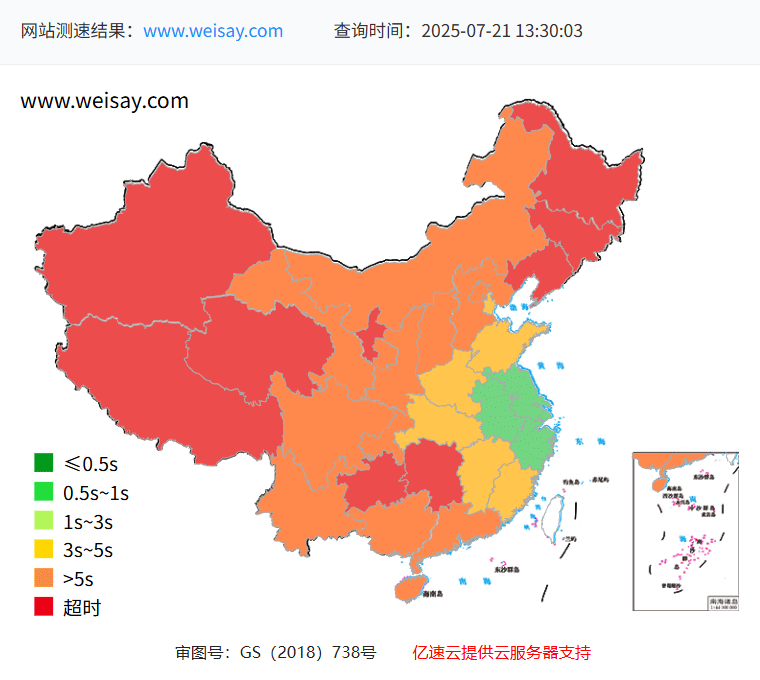
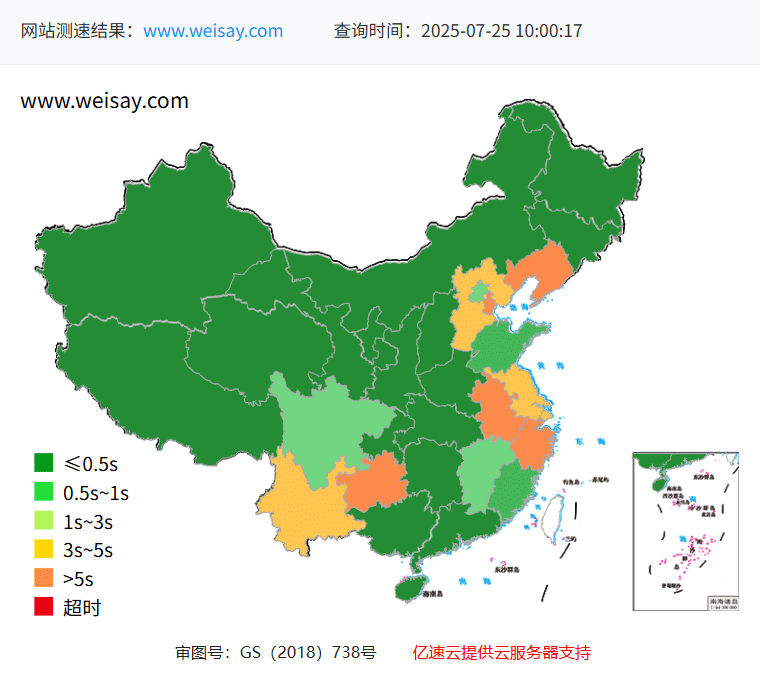
Because the origin server is located in Shanghai, access from my own location has always been relatively fast. The more meaningful comparison is whether visitors who previously experienced slow loading saw an improvement after the switch. That is also the part that is hardest to judge from a single local test.
The acceleration effect was real enough to be visible in testing, but the later CPU problems made the overall experience less straightforward than expected. For that reason, I eventually stopped using EdgeOne while trying to understand what had caused the unusually high resource usage.