Common Hadoop and HDFS Ports
A few ports come up constantly when working with a Hadoop cluster:
<table> <thead> <tr> <th>Purpose</th> <th>Port</th> <th>What it is used for</th> </tr> </thead> <tbody> <tr> <td>HDFS management</td> <td>9870</td> <td>NameNode Web UI</td> </tr> <tr> <td>MapReduce / YARN job status</td> <td>8088</td> <td>Check YARN application execution</td> </tr> <tr> <td>History server</td> <td>19888</td> <td>View completed job history</td> </tr> <tr> <td>HDFS client access</td> <td>8020</td> <td>HDFS client entry point</td> </tr> </tbody> </table>What the main Hadoop configuration files do
Several configuration files define how Hadoop behaves at different layers:
- core-site.xml: core Hadoop settings, such as the default filesystem URI and general I/O behavior.
- hdfs-site.xml: HDFS-specific storage settings, including replication count, block size, and permission checks.
- mapred-site.xml: MapReduce runtime parameters, such as the job framework and JVM-related options.
- yarn-site.xml: YARN resource scheduling configuration, including memory, CPU, queues, and node management.
- workers: the hostname list for all DataNode machines.
How HDFS writes a file
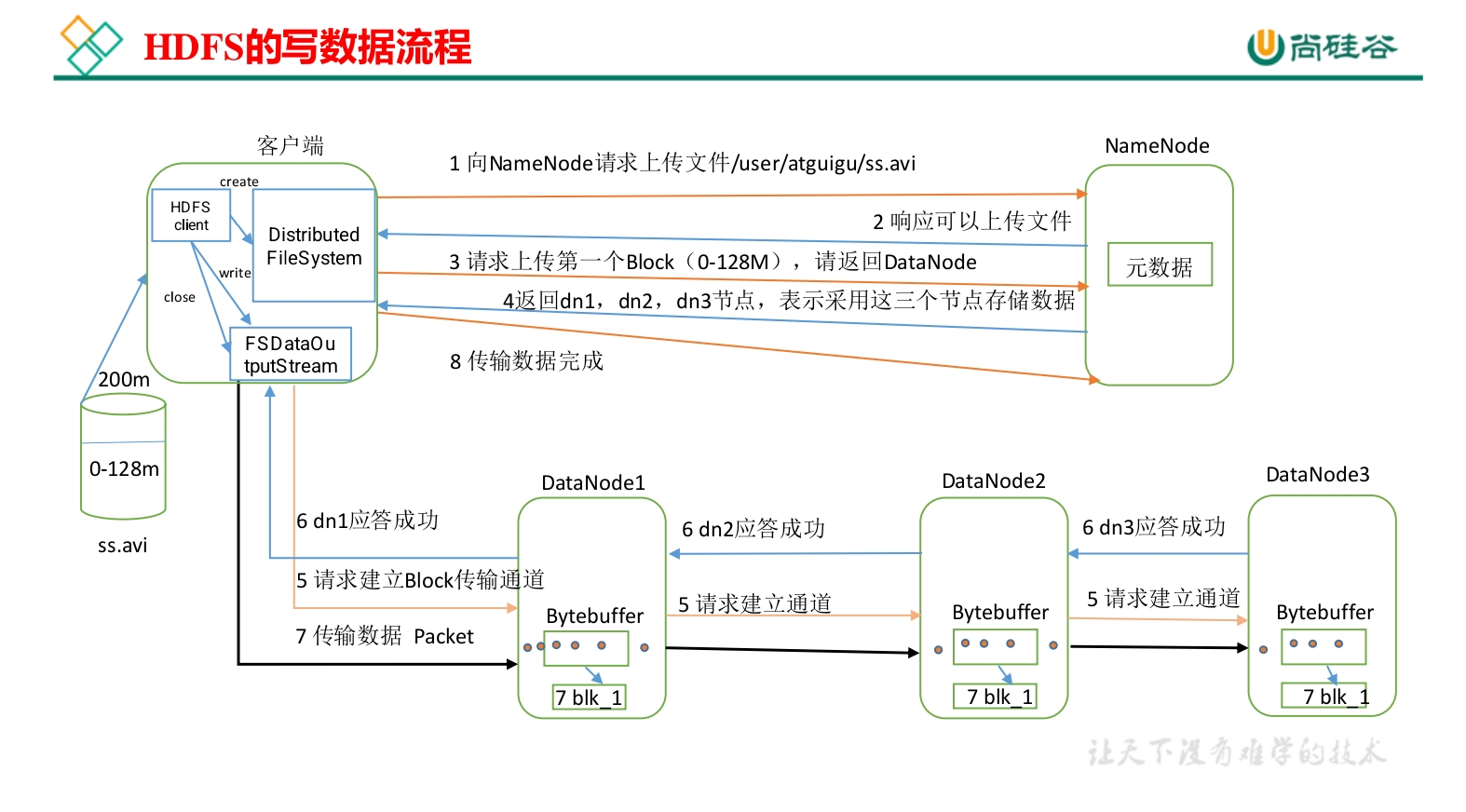
Assume the replication factor is 3. The upload path from a client into HDFS can be understood as a sequence of metadata negotiation, block placement, pipeline transmission, and final metadata persistence.
1. The client asks to upload
The client uses DistributedFileSystem to send a write request to the NameNode.
Before allowing the write, the NameNode checks a few basic things:
- whether the file already exists;
- whether the target directory exists;
- whether the client has the required permissions.
If these checks pass, the NameNode authorizes the upload. If not, it returns an error and the operation stops there.
2. The NameNode assigns where blocks should go
The file is split into one or more blocks on the client side. The default block size is typically 128 MB.
The client asks the NameNode where to place the first block. Based on rack awareness, the NameNode returns three DataNodes for the three replicas:
- the first replica goes to the local node, or at least the same rack;
- the second replica goes to a different rack;
- the third replica goes to a different node on the same rack as the second replica.
This placement balances reliability and network cost. Replicas are not concentrated in one place, but they are also not spread randomly without regard for transfer efficiency.
3. A write pipeline is built
The client opens an FSDataOutputStream connection to the first DataNode, often described as DN1.
Then the pipeline extends step by step:
- DN1 connects to DN2;
- DN2 connects to DN3.
The resulting path is:
Client → DN1 → DN2 → DN3
Each node completes a handshake, and once the chain is ready, data can begin flowing through a stable transmission pipeline.
4. Data is sent in packets, with acknowledgements flowing back
The client does not stream the whole file as one giant unit. It writes data as packets.
For each packet:
- the client sends it to DN1;
- DN1 forwards it to DN2;
- DN2 forwards it to DN3;
- DN3 writes the packet to local disk and sends an acknowledgement back;
- DN2 receives DN3's acknowledgement and then responds to DN1;
- DN1 receives that acknowledgement and finally notifies the client.
Only after this reverse confirmation chain completes does the client treat the packet as successfully written.
In other words, the ack path is effectively:
DN3 → DN2 → DN1 → Client
If one DataNode fails during the write, the NameNode allocates a replacement target so the missing replica can be rebuilt elsewhere.
5. The same process repeats for later blocks
Once one block is full, the client asks the NameNode for placement information for the next block.
Then the same pattern repeats:
- request target DataNodes;
- create a new pipeline;
- send packets;
- wait for acknowledgements.
After all blocks have been written successfully:
- the client closes the output stream;
- the NameNode updates the file metadata, including the filename, block list, and replica locations.
What is persisted at the end
When the write finishes:
- the NameNode persists the file's metadata;
- the DataNodes store the actual physical block data.
That completes the HDFS write process.
How HDFS reads a file
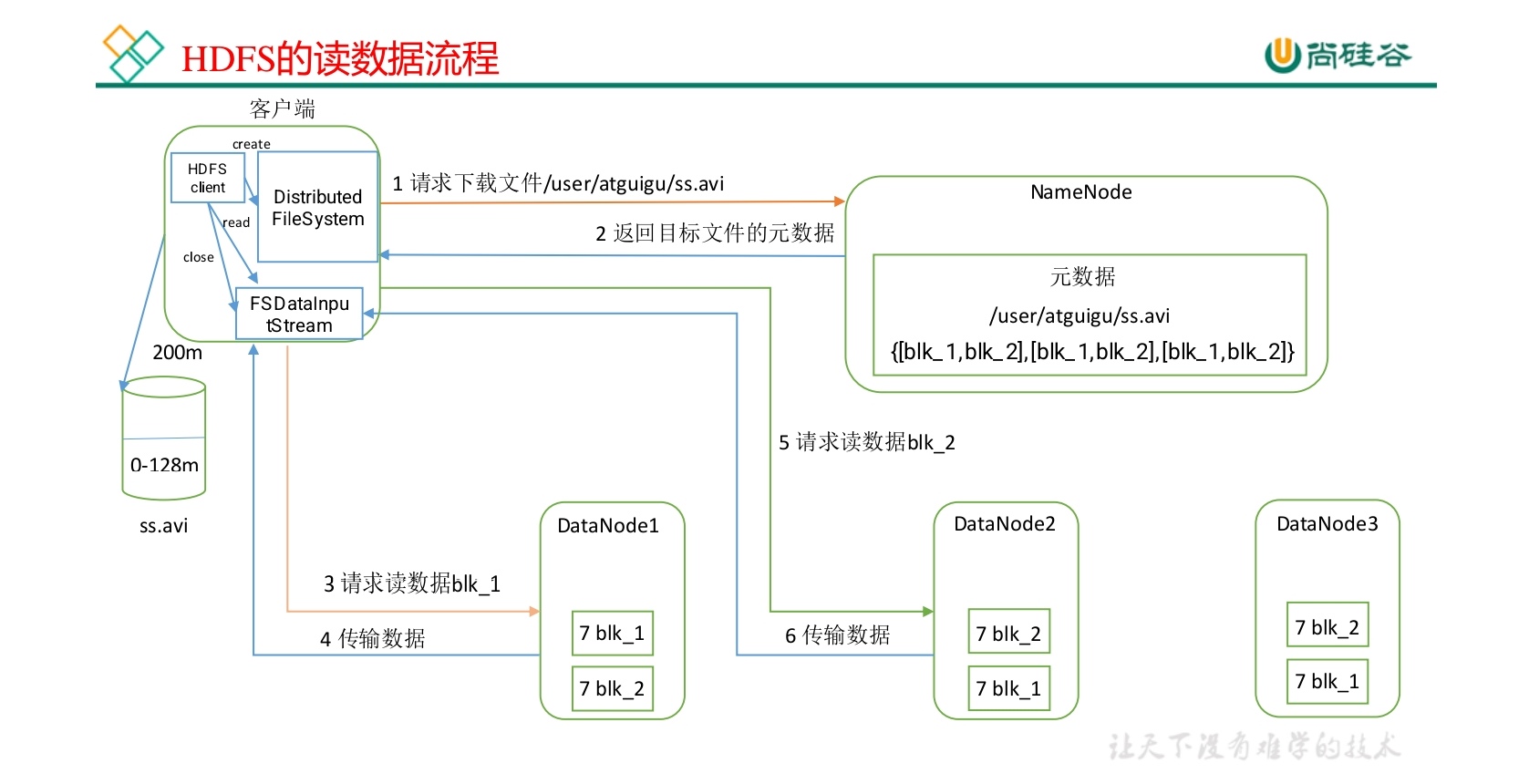
Reading follows a different path from writing. Metadata still comes from the NameNode, but the file contents are read directly from DataNodes. For a file that spans multiple blocks, HDFS reads block by block and handles failures by switching replicas automatically.
1. The client requests the file
The client calls open() through DistributedFileSystem.
This sends a request to the NameNode for the file's block list. The NameNode returns:
- which DataNodes hold replicas of each block;
- network topology information for those nodes, such as rack location and relative distance.
2. Replica locations are sorted by proximity
The NameNode estimates the distance between the client and each candidate DataNode, then returns replica lists ordered from nearest to farthest.
The selection preference is typically:
- same node first;
- if not available, same rack;
- otherwise, a node on another rack.
This "read local or near-local if possible" strategy reduces latency and unnecessary cross-rack traffic, which is why HDFS reads can achieve high throughput in distributed environments.
3. The client opens an input stream and starts reading
The client obtains an FSDataInputStream, which internally wraps DFSInputStream.
DFSInputStream automatically chooses the nearest replica. Then, when the application calls read():
- data is streamed from the selected DataNode for the current block;
- the data is placed into the client's memory buffer;
- the buffered data is handed to the application layer;
- after the current block is finished, the connection for that block is closed.
4. Failover happens automatically if a replica cannot be read
If the current DataNode fails during a read:
- the client automatically switches to the next closest replica;
- the client also informs the NameNode that the failed replica should be treated as bad;
- later, the NameNode triggers replica repair so the configured redundancy can be restored.
This is one of the reasons HDFS is considered fault-tolerant from the application's point of view: many failures are absorbed by replica switching instead of surfacing directly to the user.
5. Multi-block files are read continuously
If the file contains multiple blocks, the process continues block by block.
After the current block is read:
DFSInputStreamrequests the next block locations from the NameNode;- it again chooses the nearest replica;
- the next block is streamed and returned to the application.
On the client side, these blocks are reassembled into the complete file in order.
6. Streams and resources are closed
After all data has been read:
- the client closes the input stream;
- HDFS releases the associated connections and cached resources automatically.
Why small files are a problem in HDFS
HDFS is designed for large, sequential I/O. Small files break that assumption and usually hurt the NameNode long before they hurt disk capacity.
The main cost of too many small files
Each file or block consumes about 150 bytes of metadata memory in the NameNode.
When the cluster accumulates a large number of small files, the impact is not the file size itself but the metadata explosion. That leads to problems such as:
- NameNode memory growth;
- more frequent GC;
- slower RPC response;
- noticeably worse filesystem operation efficiency.
A rough example from this rule of thumb:
128 GB of memory can hold metadata for about 900 million file blocks:
128×1024³ ÷ 150 ≈ 9×10⁸
The figure is only meant to show how metadata pressure scales, but it explains why millions of tiny files are dangerous even if their total payload is not very large.
Common ways to mitigate the small-file issue
1. HAR archives
Hadoop Archive (HAR) packages many small files into a single .har file.
This reduces the number of metadata entries the NameNode must track. It is better suited for long-term storage and read-only data than for frequently updated data.
2. CombineTextInputFormat
During MapReduce input processing, CombineTextInputFormat can merge multiple small files into one split.
That improves processing efficiency and avoids wasting task startup overhead on extremely small inputs.
3. JVM reuse
If every small file causes a new JVM to be launched, task overhead becomes expensive. JVM reuse can reduce that cost.
The following setting can be placed in mapred-site.xml:
     <property>
       <name>mapreduce.job.jvm.numtasks</name>
       <value>10</value>
       <description>Number of tasks to run per JVM (-1 = unlimited)</description>
     </property>
This should be used with care. If there is no small-file workload, enabling JVM reuse unnecessarily can occupy task slot resources.
Read vs. write at a glance
<table> <thead> <tr> <th>Operation</th> <th>Main steps</th> <th>Typical characteristics</th> </tr> </thead> <tbody> <tr> <td>Write</td> <td>check → choose nodes → build pipeline → transmit data → acknowledgements → update metadata</td> <td>pipelined transfer, high reliability</td> </tr> <tr> <td>Read</td> <td>fetch block metadata → sort replicas → connect → read block by block → fail over automatically</td> <td>nearest-replica reads, high throughput</td> </tr> </tbody> </table>HDFS architecture and common interview points
Core components in HDFS
HDFS is built around a few distinct roles:
<table> <thead> <tr> <th>Component</th> <th>Responsibility</th> </tr> </thead> <tbody> <tr> <td>NameNode (NN)</td> <td>Manages the filesystem namespace and metadata, including which blocks belong to each file and where those blocks are stored.</td> </tr> <tr> <td>DataNode (DN)</td> <td>Stores actual block data and periodically reports heartbeats and block information to the NameNode.</td> </tr> <tr> <td>Secondary NameNode (SNN)</td> <td>Periodically mergesfsimage and edits to reduce pressure on the NameNode. It is not a standby replacement node.</td>
</tr>
<tr>
<td>Client</td>
<td>Initiates reads and writes, requests metadata from the NameNode, and transfers actual data with DataNodes.</td>
</tr>
</tbody>
</table>
NameNode vs. Secondary NameNode
These two are often confused, but they do very different jobs:
<table> <thead> <tr> <th>Comparison</th> <th>NameNode</th> <th>Secondary NameNode</th> </tr> </thead> <tbody> <tr> <td>Core role</td> <td>Manages namespace and live metadata</td> <td>Periodically merges edit logs and generates a newer metadata snapshot</td> </tr> <tr> <td>Data handling</td> <td>Maintains the latest filesystem state in memory</td> <td>Pulls metadata files from the NameNode and merges them periodically</td> </tr> <tr> <td>Real-time failover</td> <td>❌ Cannot be replaced by SNN directly</td> <td>❌ Only assists metadata maintenance</td> </tr> <tr> <td>Use during failure</td> <td>If it fails, HDFS becomes unavailable</td> <td>Can help with manual NameNode metadata recovery, but not automatic takeover</td> </tr> </tbody> </table>How HDFS achieves reliability
1. Replica-based storage
The default policy keeps three replicas for each block:
- one on the local node;
- one on another rack;
- one on a different node within that same remote rack.
The NameNode tracks replica placement so block copies are not concentrated in a single failure domain.
2. Heartbeat monitoring
DataNodes periodically send heartbeats to the NameNode.
If the heartbeat times out — by default, around 10 minutes — the NameNode marks that DataNode as failed and arranges for missing replicas to be copied from healthy nodes.
3. Pipeline write plus acknowledgement
The write pipeline is not just for performance. It is also a reliability mechanism.
Because acknowledgements propagate back through the chain, a failure at any DataNode can be detected during the write. Once that happens, replica recovery and reallocation can be triggered.
What happens if a DataNode goes down
When a DataNode stops sending heartbeats in time:
- the NameNode marks it as dead;
- it schedules replication work for the blocks whose replicas were lost;
- healthy replicas on other nodes are copied to new DataNodes;
- the target replication count, usually 3, is restored.
Why HDFS uses large blocks
HDFS prefers large blocks, commonly 128 MB or 256 MB, for practical reasons:
- fewer block addresses to manage;
- less metadata pressure on the NameNode;
- better sequential read/write performance.
The tradeoff is clear: this design is poor for workloads dominated by large numbers of tiny files.
Why pipeline writing is used
Pipeline writing is a fundamental design choice in HDFS.
Its benefits include:
- replicas can be distributed while data is flowing;
- transfer efficiency is high;
- distributed parallelism is achieved without the client opening separate full write streams to every replica.
The basic form is still:
Client → DN1 → DN2 → DN3
If any DataNode in the chain fails, HDFS can reassign the missing replica target and continue protecting the data.
Why reads prefer the nearest replica
When the NameNode returns block locations, it sorts replicas by network distance according to rack awareness.
That behavior exists to:
- reduce cross-rack traffic;
- improve throughput;
- keep the read path efficient and resilient.
Instead of treating all replicas as equal, HDFS tries to make locality a first-class optimization.
Consistency and safety in HDFS
Write-once, read-many
HDFS follows a Write Once, Read Many model.
Once a file is written and closed, it is not meant for arbitrary in-place modification. This avoids many consistency problems caused by concurrent writes and simplifies distributed coordination.
All metadata changes are centrally managed by the NameNode.
Preventing accidental deletion
A Trash mechanism can be enabled so deleted files first move into a .Trash directory instead of disappearing immediately.
After the configured retention period expires, they are removed automatically.
A related configuration example is:
  <property>
    <name>fs.trash.interval</name>
    <value>1440</value> <!-- 保留时间:分钟 -->
  </property>
Useful tuning directions
A few settings matter often in practice:
<table> <thead> <tr> <th>Tuning area</th> <th>Key configuration</th> <th>Notes</th> </tr> </thead> <tbody> <tr> <td>Block size</td> <td>dfs.blocksize</td>
<td>Can be increased for large-file workloads, for example to 256 MB</td>
</tr>
<tr>
<td>Replication factor</td>
<td>dfs.replication</td>
<td>Default is 3; tune based on reliability and storage cost</td>
</tr>
<tr>
<td>JVM reuse</td>
<td>mapreduce.job.jvm.numtasks</td>
<td>Often worth enabling for small-file scenarios</td>
</tr>
<tr>
<td>NameNode concurrency</td>
<td>dfs.namenode.handler.count</td>
<td>Helps improve RPC handling concurrency</td>
</tr>
<tr>
<td>Network topology</td>
<td>Rack Awareness</td>
<td>Reduces cross-rack communication and improves speed</td>
</tr>
</tbody>
</table>
Quick memory hooks
If you need the shortest possible way to remember HDFS behavior:
- HDFS is a distributed filesystem built for high reliability, high throughput, and a write-once-read-many model.
- The NameNode manages metadata; DataNodes store the actual blocks.
- Writes go through a pipeline; reads prefer the nearest replica.
- Small files are hard on NameNode memory; large files fit HDFS much better.
- Reliability comes from replication; consistency comes from controlled write semantics.