I recently noticed that one of my Alibaba Cloud accounts was eligible for a free one-month ECS instance, so I decided to claim it and use the chance to do a quick hands-on test.
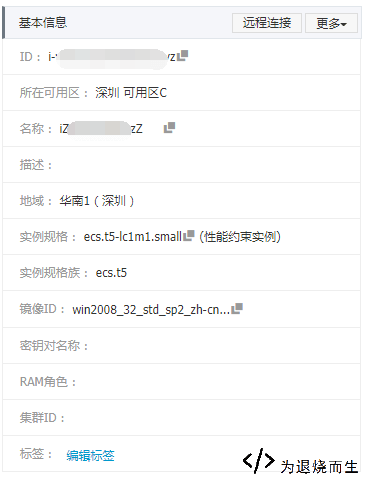
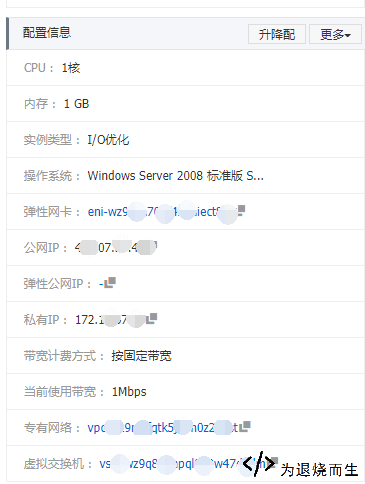
The instance I received was a very basic ECS configuration: 1 vCPU, 1 GB of RAM, 1 Mbps bandwidth, and a 40 GB SSD system disk. The operating system is optional. If you prefer a graphical environment, Windows is easier to get started with; if you are more comfortable with the command line, Linux is the usual choice. I installed Windows this time, mainly because I already had a Linux server and wanted to try the Windows experience on ECS.
Here are the configuration details shown in the console:
The first catch: CPU credits on the T5 instance
After entering the management console, the first unpleasant detail became obvious: this ECS T5 instance uses a CPU credit mechanism.
Once CPU usage goes above 20%, it starts consuming CPU credits. If the credits are exhausted, the CPU is throttled down to 10% performance. There is also an “unlimited” mode, but enabling it means you pay for excess CPU usage — 0.005 yuan per minute. Unless you are prepared for that cost, it is better not to turn on unlimited performance, because if the CPU stays fully loaded for some unexpected reason, the bill can become painful very quickly. At full load, that would be about 18 yuan per hour, or 432 yuan per day.
CPU credits can recover when the CPU usage is low, generally when utilization stays below 10%.
Network latency test
Next I tested the connection speed using direct IP ping checks.
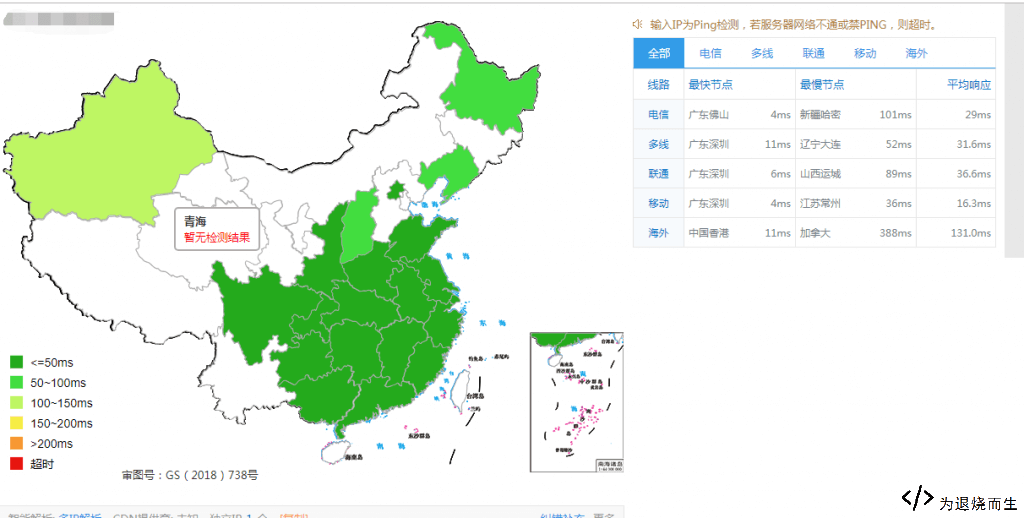
The ping results were fairly good overall. Most regions stayed within 40 ms, except for some more remote locations where latency was naturally higher.
I also tested basic web access speed. The page opened quite quickly, generally under 400 ms. The test environment used the BaoTa panel on port 99 with a WNMP setup.
Built-in security service: useful, but limited
The ECS instance also came with Alibaba Cloud’s free security service, commonly known as Anquanshi.

In actual use, the free version feels rather limited. It can scan for vulnerabilities and check host status, but many of the more practical security and asset-management features are reserved for the paid edition.
The free version supports automatic vulnerability checks every other day, including some software-configuration and system-component vulnerability scans. It also includes abnormal login alerts for unusual locations, brute-force login defense, and webshell detection, although webshell handling is limited to detection rather than full cleanup.
A lot of the stronger features require the paid edition, including:
- Baseline checks for account security, password policies, weak passwords, system configuration risks, registry risks, and Redis high-risk configurations.
- Compliance baseline checks such as CIS-Linux CentOS 7.
- Custom baseline detection cycles for 1, 3, 7, or 30 days.
- Login control alerts for non-whitelisted IP addresses, illegal login times, and unauthorized login accounts.
- Full webshell removal instead of detection only.
- Host anomaly detection, including reverse shells, Java processes executing CMD commands, suspicious Bash downloads, abnormal network connections, C&C botnet behavior, malicious download sources, and cloud-based virus scanning.
- Detection of tampered system or application files.
- Hidden accounts, public-key accounts, and other abnormal account changes.
- Asset grouping, tagging, and host management.
- Asset inventory for listening ports, accounts, processes, and installed software.
- Log search for process startup events, process snapshots, outbound network connections, system logins through SSH or RDP, port-listening snapshots, and account snapshots.
- Automatic malware handling for ransomware, DDoS-related programs, mining software, and common virus programs.
- Website anti-tampering protection, which is a separate paid add-on and can monitor website directories in real time, then restore modified files or directories from backups.
So the included free security service is not useless, but it is closer to a basic scanner and warning tool. If you need deeper host protection, asset inventory, detailed logs, or automatic response features, the free edition is clearly not enough.
Overall impression
For a small free instance, the Alibaba Cloud ECS performance is still quite decent. The network latency is acceptable, web response speed is fast enough for lightweight use, and the system can run a simple Windows environment with a web stack.
The main thing to watch is the T5 CPU credit mechanism. For light workloads, it should be fine. But if the server suddenly runs at high CPU usage for a long time, the throttling or unlimited-mode charges can become a real problem. As long as you understand that limitation, this 1-core, 1 GB ECS instance is still usable for testing, simple panels, small websites, or temporary experiments.