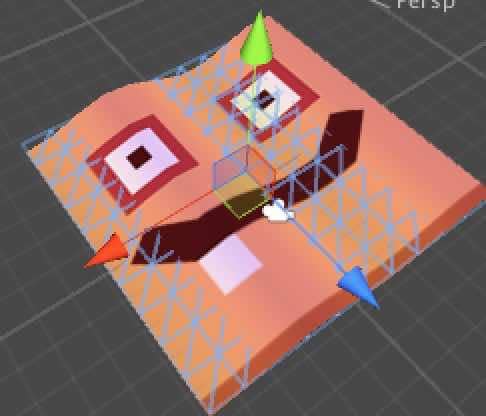
A first look at using Shader Vertex.
Basic
Example
1 2 3 4 5 6 7 8 9 10 11 12 13 14 15 16 17 18 19 20 21 22 23 24 25 26 27 28 29 30 31 32 | Shader "Custom/vertexShader" { Properties { _Color ("Color", Color) = (1,1,1,1) } SubShader { Tags { "RenderType"="Opaque" } LOD 200 CGPROGRAM #pragma surface surf Lambert vertex : vert #pragma target 2.0 struct Input { float2 uv_MainTex; float4 vertColor; }; fixed4 _Color; void vert (inout appdata_full v,out Input o) { o.vertColor = v.color; } void surf (Input IN, inout SurfaceOutput o) { o.Albedo = IN.vertColor.rgb * _Color.rgb; } ENDCG } FallBack "Diffuse" }
```
Parameter details
appdata_fullis defined inUnityCG.cginc. As the name suggests, it carries most of the vertex attributes you might need for calculations.
1 2 3 4 5 6 7 8 9 10 11 12 13 14 15 16 17 18 | struct appdata_full { //顶点 float4 vertex : POSITION; //切线 float4 tangent : TANGENT; //法线 float3 normal : NORMAL; //顶点坐标(字面意思,以此类推) float4 texcoord : TEXCOORD0; float4 texcoord1 : TEXCOORD1; float4 texcoord2 : TEXCOORD2; float4 texcoord3 : TEXCOORD3; #if defined(SHADER_API_XBOX360) //4-5 移动端暂时就别想了 half4 texcoord4 : TEXCOORD4; half4 texcoord5 : TEXCOORD5; #endif fixed4 color : COLOR; };
It also has two lighter variants, appdata_base and appdata_tan. In practice they are just trimmed-down versions of appdata_full. When should you use the simpler ones? Naturally, the simpler the structure, the better for performance.
1 2 3 4 5 6 7 8 9 10 11 12 | struct appdata_base { float4 vertex : POSITION; float3 normal : NORMAL; float4 texcoord : TEXCOORD0; }; struct appdata_tan { float4 vertex : POSITION; float4 tangent : TANGENT; float3 normal : NORMAL; float4 texcoord : TEXCOORD0; };
SurfaceOutputis defined inLighting.cginc. It is probably one of the most familiar structures in shader work, but it is still worth laying out here.
1 2 3 4 5 6 7 8 9 10 11 12 13 14 | struct SurfaceOutput { //本身的颜色 fixed3 Albedo; //法线贴图 fixed3 Normal; //自发光 fixed3 Emission; //反光 half Specular; //光泽度 fixed Gloss; //透明 fixed Alpha; };
Effect
Preview
The result is the image at the top. I won't spend time explaining the math behind the animation here; after all, that's not the sort of thing you can fully clarify just by talking through it.
1 2 3 4 5 6 7 8 9 10 11 12 13 14 15 16 17 18 19 20 21 22 23 24 25 26 27 28 29 30 31 32 33 34 35 36 37 38 39 40 41 42 43 44 45 46 47 48 49 50 51 52 53 54 55 56 | Shader "test/vertexAnimation" { Properties { _ColorA ("Color", Color) = (1,1,1,1) _ColorB ("Color", Color) = (1,1,1,1) _MainTex ("Albedo (RGB)", 2D) = "white" {} _TintAmount("TintAmount",Range(0,1)) = 0.5 _Speed("Wave Speed",Range(0.1,80)) = 1 _Frequency("Wave Frequency",Range(0,5)) = 2 _Amplitude("Wave Amplitude",Range(-1,1)) = 1 } SubShader { Tags { "RenderType"="Opaque" } LOD 200 CGPROGRAM #pragma surface surf Lambert vertex:vert #pragma target 2.0 sampler2D _MainTex; fixed4 _ColorA; fixed4 _ColorB; float _TintAmount; float _Speed; float _Frequency; float _Amplitude; struct Input{ float2 uv_MainTex; float4 vertColor; }; void vert (inout appdata_full v,out Input o) { UNITY_INITIALIZE_OUTPUT(Input,o); float time = _Time * _Speed; float waveValueA = sin(time + v.vertex.x * _Frequency) * _Amplitude; v.vertex.xyz = float3(v.vertex.x , v.vertex.y + waveValueA , v.vertex.z); v.normal = normalize(float3(v.normal.x + waveValueA,v.normal.y,v.normal.z)); o.vertColor = float4(waveValueA,waveValueA,waveValueA,255); } void surf (Input IN, inout SurfaceOutput o) { // Albedo comes from a texture tinted by color fixed4 c = tex2D (_MainTex, IN.uv_MainTex); float3 tintColor = lerp(_ColorA,_ColorB,IN.vertColor).rgb; o.Albedo = c.rgb * (tintColor * _TintAmount); o.Alpha = c.a; } ENDCG } FallBack "Diffuse" }
WARNING
#pragma function declarations
When declaring a function with #pragma, do not reuse the same name, or the shader will fail to compile. That is basic stuff: during compilation, the engine searches all compile-time files to see whether that function name already exists.
in, out, inout
in, out, and inout are CG language keywords used to describe input and output behavior on GPU registers. A simple way to think about them is:
1 2 3 4 5 6 7 8 | 1. in: 修辞一个形参只是用于输入,进入函数体时被初始化,且该形参值 的改变不会影响实参值,这是典型的值传递方式。 2. out: 修辞一个形参只是用于输出的,进入函数体时并没有被初始化,这 种类型的形参一般是一个函数的运行结果; 3. inout: 修辞一个形参既用于输入也用于输出,这是典型的引用传递。 举例如下: void myFunction(out float x); //形参 x,只是用于输出 void myFunction(inout float x); //形参 x,即用于输入时初始化,也用于输出数据 void myFunction(in float x); //形参 x,只是用于输入 void myFunction(float x); /等价与 in float x,这种用法和 C\C++完全一致 也可以使用 return 语句来代替 out 修辞符的使用。输入\输出修辞符通常和语 义词一起使用,表示顶点着色程序和片段着色程序的输入输出。
in: the parameter is used only for input. It is initialized when the function starts, and any changes inside the function do not affect the original value. This is the usual pass-by-value behavior.out: the parameter is used only for output. It is not initialized on entry, and it usually represents a function result.inout: the parameter is used for both input and output, which is the typical reference-style behavior.
These modifiers are often used together with semantics to describe shader inputs and outputs.
Using Lambert's vertex
When you define a custom vertex function under Lambert, the editor may report an error by default. In that case, add the line below. It can be treated as a DirectX 11 hack.
1 | UNITY_INITIALIZE_OUTPUT(Input,o);
Using _Time
If you multiply _Time directly by a float, the default component that gets used is _Time.x.
1 | float4 _Time : Time (t/20, t, t*2, t*3), use to animate things inside the shaders