CSS rendering differences between Internet Explorer and Firefox once made cross-browser layout work unusually complicated. The most useful hacks were not necessarily the cleverest ones, but the small, predictable rules that solved a specific compatibility problem without disturbing the rest of the stylesheet.
Basic browser-targeting syntax
The following example demonstrates how the same property can be assigned different values for different browsers:
.color{

background-color: #CC00FF; /*所有浏览器都会显示为紫色*/

background-color: #FF0000\\9; /*IE6、IE7、IE8会显示红色*/

*background-color: #0066FF; /*IE6、IE7会变为蓝色*/

_background-color: #009933; /*IE6会变为绿色*/

_background /**/:#ccc; /* IE5.5会变为灰色*/

}
The commonly used selectors and suffixes can be read as follows:
\\9: IE6, IE7, and IE8*: IE6 and IE7_: IE6*\\+: IE7
The order of declarations matters. A common convention is to write the rule for Firefox and other standard browsers first, the IE7-specific rule next, and the IE6-specific rule last.
For example:
select{
Color:blue;//所有浏览器
Color:yellow\\9;//所有IE浏览器
*Color:red;//forIE7
_Color:green;//forIE6
}
Separating Firefox, IE7, and IE6
One approach combines the universal selector hack with !important:
body
{
background:red;
*background:blue !important;
*background: green;
}
The first declaration is used by Firefox and other browsers. IE7 can recognize both the * prefix and !important, so the second declaration applies to it. IE6 can recognize the * prefix but not the same !important behavior, allowing the third declaration to take effect.
A simpler alternative uses the underscore hack for IE6:
body
{
background:red;
*background:blue;
_background: green;
}
Here, the ordinary declaration is for Firefox and other browsers, the * declaration targets IE7, and the underscored declaration targets IE6.
Common compatibility problems
1. Always consider the doctype
The DOCTYPE declaration affects how CSS is processed. Although it can influence compatibility behavior, it is also important for validating a page against Web standards and should not be omitted casually.
2. Centering blocks
In Firefox, a block with both margin-left and margin-right set to auto is centered directly. Older versions of IE may require additional handling.
Similarly, setting text-align on body does not by itself center a div in Firefox. The div generally needs margin: auto, especially for its left and right margins.
3. Padding and the box model
Firefox and IE do not always calculate the dimensions of a padded div in the same way. In some cases, Firefox adds the padding to the declared height and width while IE does not. A separate dimension can be supplied with !important when a browser-specific adjustment is necessary.
Firefox supports !important, while older IE versions may ignore it in the relevant parsing situation. This made it possible to place a Firefox-specific declaration before an IE fallback.
4. Vertical centering with line-height
A single line of text can be vertically centered by setting the line height to match the height of its containing div:
vertical-align:middle;
line-height:200px;
This method is only suitable when the content is guaranteed not to wrap.
5. Cursor values
cursor: pointer displays a hand cursor in both IE and Firefox. The value hand works only in IE, so pointer is the safer cross-browser choice.
6. Links used as menu items
In Firefox, a link with a border and background color may need display: block. Adding float: left can keep menu items on one line. Giving both the link and its menu container an explicit height helps prevent the bottom edge from being rendered at different positions. If no height is specified, an empty space can sometimes be inserted into the menu container instead.
7. The two-pixel margin discrepancy
Different interpretations of the box model can produce a two-pixel difference between Mozilla-based browsers and IE. A commonly used workaround is:
div{margin:30px!important;margin:28px;}
The order is important and must not be reversed. IE ignores the !important declaration in this situation and effectively reads the rule as:
div{maring:30px;margin:28px}
When the same property is declared twice, the later declaration wins. Therefore, writing only margin:XXpx!important; would not provide the intended fallback.
8. IE5 and IE6 box-model differences
The following rule is interpreted differently by IE5 and by IE6 or other browsers:
div{width:300px;margin:0 10px 0 10px;}
Under IE5's calculation, the effective width becomes 300px - 10px - 10px = 280px. IE6 and other browsers calculate it as 300px + 10px + 10px = 320px in the situation described here.
A compatibility adjustment used at the time was:
div{width:300px!important;width /**/:340px;margin:0 10px 0 10px}
The /**/ sequence was used as part of the browser distinction: IE5 and Firefox recognized the relevant form, while IE6 did not.
9. Reset list spacing
Mozilla browsers apply default padding to ul, while IE traditionally supplies a default margin instead. Resetting both values avoids many list-layout discrepancies:
ul{margin:0;padding:0;}
Float-related problems
Clear floating elements properly
A floating layout needs to be closed explicitly. Suppose floatA and floatB are both floated left, while NOTfloatC is intended to appear below them:
<#div id=”floatA” >
<#div id=”floatB” >
<#div id=”NOTfloatC” >
This may appear to work in IE but fail in Firefox because NOTfloatC is not itself floated and the preceding floats have not been cleared. A clearing element should be inserted between the floated elements and the following content:
<#div class=”floatB”>
<#div class=”clear”>
<#div class=”NOTfloatC”>
The clearing element must be placed at the correct level, alongside the floated elements rather than inside an unrelated nested structure. Its style can be defined as follows:
.clear{
clear:both;}
For a wrapper containing floated boxes, overflow:hidden can allow the wrapper to contain the layout height. In IE, automatic height expansion may still fail because of its layout behavior. Adding zoom:1 triggers the needed private layout property:
.colwrapper{
overflow:hidden;
zoom:1;
margin:5px auto;}
IE's doubled float margins
A div floated in IE may render its declared margin at twice the intended size, a problem also found in IE6. Adding display:inline to the floated element is the usual workaround:
<#div id=”imfloat”>
#IamFloat{
float:left;
margin:5px;/*IE下理解为10px*/
display:inline;/*IE下再理解为5px*/}
Check the width of nested containers
When two or three floated div elements are arranged side by side inside a parent, width errors are easy to introduce. In IE, a wider child can force the outer container beyond its intended width. Pixel-level measurements from a design file may be necessary when the layout depends on exact dimensions.
Avoid fixed heights for dynamic content
If content is added dynamically, it is generally safer to leave the height undefined so the browser can expand the container. Fixed content can use an explicit height, although some layouts may still fail to expand downward automatically and require further adjustment.
Using !important as a last resort
When a small difference cannot otherwise be corrected, !important can provide a browser-specific override. Firefox gives priority to the marked declaration, while IE uses the following unmarked fallback:
.tabd1{
background:url(/res/images/up/tab1.gif) no-repeat 0px 0px !important; /*Style for FF*/
background:url(/res/images/up/tab1.gif) no-repeat 1px 0px; /* Style for IE */}
The !important declaration must appear before the fallback declaration. If the order is reversed, the fallback can override the intended value.
IE8-specific distinctions
The \\9 suffix was widely used to target IE6 through IE8. In the compatibility tests described here, \\0 was recognized only by IE8, not by IE6 or IE7, making it a more specific IE8 hack.
The browser abbreviations in the comparison table are OP for Opera, SA for Safari, and Ch for Chrome. The corresponding example is:
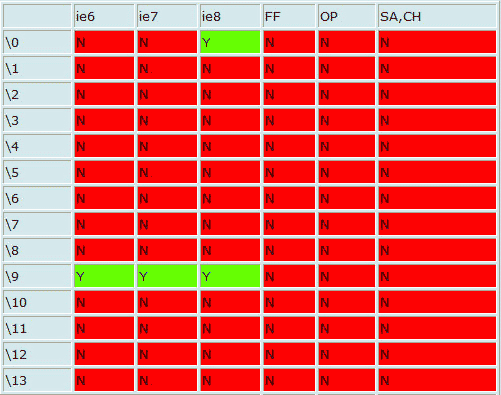
.test{
color:#000000; /* FF,OP支持 */
color:#0000FF\\0; /* IE8支持*/
[color:#000000;color:#00FF00; /* SF,CH支持 */
*color:#FFFF00; /* IE7支持 */
_color:#FF0000; /* IE6支持 */
}
The \\9 version can be used when the target is IE6, IE7, and IE8 together:
.test{
color:#000000; /* FF,OP支持 */
color:#0000FF\\9; /* 所有IE浏览器(ie6\+)支持 ;但是IE8不能识别“*”和“_”的css hack;所以我们可以这样写hack */
[color:#000000;color:#00FF00; /* SF,CH支持 */
*color:#FFFF00; /* IE7支持 */
_color:#FF0000; /* IE6支持 */
}
A more complete version separates the major IE releases with the available syntax:
#test{
color:red; /* 所有浏览器都支持 */
color:red !important;/* Firefox、IE7支持 */
_color:red; /* IE6支持 */
*color:red; /* IE6、IE7支持 */
*\\+color:red; /* IE7支持 */
color:red\\9; /* IE6、IE7、IE8支持 */
color:red\\0; /* IE8支持 */
}
The reported browser behavior can be summarized this way: IE recognizes * and \\9; standard browsers such as Firefox do not recognize the * hack. IE6 recognizes _, \\+, #, and @, while IE7 recognizes \\+, #, @, and !important but not _. Firefox recognizes !important but not _, \\+, #, or @.
These techniques depend heavily on declaration order and on the exact browser version. They were practical ways to isolate old IE behavior, but each hack should be limited to the specific compatibility issue it is meant to solve.