Why keeping a blog matters
I had already planned to publish the piece below, then suddenly remembered a point I really needed to write down — a very important one: the meaning of keeping a blog.
A while ago I messed around too much and ended up breaking almost everything on the Raspberry Pi side. When I reinstalled the system, I still had some exported backups, but I had almost completely forgotten how I had set up the services in the first place. Luckily, every step of the setup process had been recorded on this site. It saved me a lot of time and trouble, because I basically restored everything by following my own posts one by one.
Maybe that is the real value of running your own site and writing a blog: keeping a record of everything you want to remember.
A lot of unnecessary tinkering
Lately I’ve been tinkering nonstop, or rather, I’ve been planning to move everything from the cloud to local hardware — or more accurately, to recreate it locally.
Earlier this year, when I saw people in the blogger circle saying that a certain “kind-hearted cloud” provider was allowing configuration upgrades, I rushed to upgrade mine too. The annoying part was that once the specs went up, so did the renewal fee. What used to be a three-year deal for about 200 yuan now costs roughly 1,000 yuan a year to renew. Even though the current term still has a long time left, I felt I needed to try something: a full-site migration plan.
What I have on hand is a Raspberry Pi 4B with 4GB of RAM, a dedicated storage kit, and a dual-bay disk array. The storage kit has one drive as the system disk and another for storage. The RAID 1 array is 1TB and connected through the Raspberry Pi’s USB 3.0 port. The system is the official 64-bit Debian-based release, with OpenMediaVault 6 running as the main NAS service, plus Docker support.
The full-site migration I had in mind ran into all kinds of issues. I tried two different approaches. Some of what follows may reflect my own limited skills, but I really did try everything I could.
1Panel
I tried setting up a Halo-based site on 1Panel, and the speed was pretty good. Using FRP tunneling also removed a lot of reverse-proxy hassle. In my opinion, this was the least troublesome part of all the tinkering.
By comparison, getting Typecho and WordPress running caused a lot more headaches. Some problems had no real solution, and some just weren’t satisfying. In the end, I even managed to mess up OMV6.
Baota Panel
Following a suggestion from Du Lao-shi’s chatroom, I tried Baota Panel. In terms of ease of use, it really is far ahead of many others. It’s convenient and easy to get started with.
But once I began installing it, I ran into problems that dragged on for days: MySQL issues, PHP issues, conflicts everywhere. The conflicts were serious enough that apps on both sides would randomly go down. I then tried reinstalling the system, installing Baota first, then OMV6, and after that the two sides started fighting again. It was honestly close to breaking me.
Fix one thing, another thing breaks. OMV’s official docs were in foreign language, the machine translation was awful, and the same conflicts I was seeing were already discussed in other people’s forum posts. In the end, the only workable advice was to reset first, and if reset didn’t work, reinstall. After two days of trying, I finally decided to give up on this miserable thing.
Of course, there were other ideas too. This site is based on Typecho, but it can use databases other than MySQL. So I started thinking about other database options, and the image host also supports alternatives. Without a panel like Baota, doing everything by hand is a real challenge for me, mostly because I’m worried about breaking everything again. Later experiments will probably happen inside a virtual machine first, just to reduce the risk.
Or maybe I’ll switch the blog system altogether — Halo or Hexo are both on the table. I already set up Halo once, and the result after reverse proxying it out was pretty good.
Buying a new mini PC
The computer I’m using now is an old machine. Since I barely play games anymore, I haven’t bothered upgrading it. And honestly, if I were to upgrade it properly, I’d end up replacing almost everything important anyway, which is not much different from starting over.
So I decided to buy something new. A desktop wasn’t really convenient, and a laptop didn’t make much sense either. An office laptop would be pointless, while a gaming laptop doesn’t fit my needs — and I don’t have the money for one anyway. That left a mini PC.
Coincidentally, a blogger friend, Panda Is Not a Cat, posted a sponsored write-up about the Beelink SER5 MAX mini PC, saying performance had been bumped to 54W with 16GB + 1TB at no extra cost. I took a look around and found that these AMD mini PCs are actually pretty interesting: they can serve as Windows machines, Linux mini hosts, small virtual machines, and they even support Hackintosh setups.
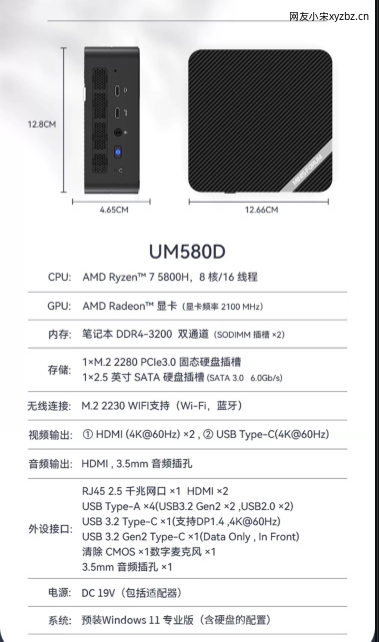
For slightly newer configurations, barebones units go for around 1,500 yuan, while older models are around 1,300 yuan. After comparing a few options, I chose the Minisforum UM580D instead, with 16GB of RAM and a 500GB SSD, priced at 1,958 yuan. I didn’t buy the barebones version because I checked quickly and found that adding brand-name memory and an M.2 SSD would come out to about the same anyway. That way, I avoid some unnecessary hassle.
By the time I’m writing this, the mini PC is already on the way. The configuration is below:
Wancent Cloud and Qinglong
Recently, my Wancent Cloud income has dropped sharply. It went from about 3 yuan a day at first to around 1 yuan now. I don’t know if it has anything to do with redeployment, but that income is getting hard to accept.
It’s all free-ridden anyway, but I do feel like it’s insulting the 500GB Great Wall SSD I’m using. Still, from the time the mechanical drive died and I moved to the SSD until now, I’ve already earned back the cost of the hardware many times over. As of today, it has brought in about 700 yuan, which is good enough for me. After all, I bought that old machine for only 40 yuan, the mechanical drive was just reused junk, and the SSD cost 150 yuan. Electricity costs can basically be ignored.
I’ll watch it for another week. If it still doesn’t work out, I’ll take it down.
As for Qinglong, JD’s anti-abuse checks have been very strict lately, and the session keeps dropping, which means I have to keep re-fetching the CK. For now, I’ve basically stopped using it and will see later whether it’s worth picking up again.
I don’t recommend that people rush into PCDN right now. If you already have low-cost hardware or some existing setup, you can try it, but keep the investment small. The water is too deep.
Layoffs
Lately, almost everyone I’ve talked to ends up mentioning work and companies. It feels like the economy is really slowing down, and layoffs are becoming more and more common.
Especially for people who graduated and started working in the past two years, they seem to be the first ones cut, mainly because they are cheaper to lay off.
So I’ve also been thinking about my own situation lately — work, life, and what comes next.
For now, the road still has to be walked. Not sure how things are where you are, but I hope work and life are going smoothly for everyone.