Kafka’s execution model and how it stores data
Kafka organizes messages by topic. Producers write to topics, and consumers read from them, so both sides interact with Kafka through the same logical abstraction.
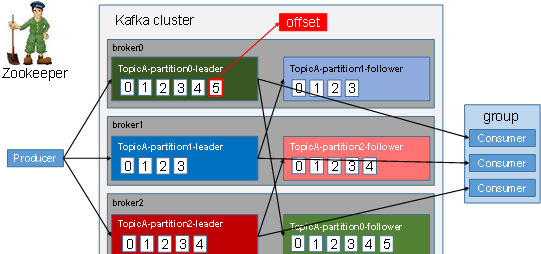
A topic is a logical concept, while a partition is the physical unit that actually holds data. Each partition corresponds to a log file that stores the records produced by the producer. New messages are appended continuously to the end of that log, and every record has its own offset.
Consumers inside a consumer group keep track of the offset they have already processed. That way, if a failure occurs, consumption can resume from the last recorded position instead of starting over.
Why Kafka splits partition logs into segments
Because Kafka appends data endlessly to the end of a log file, a single ever-growing file would eventually make data lookup inefficient. To avoid that, Kafka uses segmentation and indexing.
Each partition is divided into multiple segments, and every segment is represented by two files:
- a
.logfile, which holds the actual message data - a
.indexfile, which holds index entries used to locate data quickly
These files live inside a directory named using the pattern:
topic name + partition number
For example, if a topic named first has three partitions, Kafka will create:
first-0first-1first-2
A partition directory may look like this:
00000000000000000000.index
00000000000000000000.log
00000000000000170410.index
00000000000000170410.log
00000000000000239430.index
00000000000000239430.log
The filenames are based on the offset of the first message in the segment.
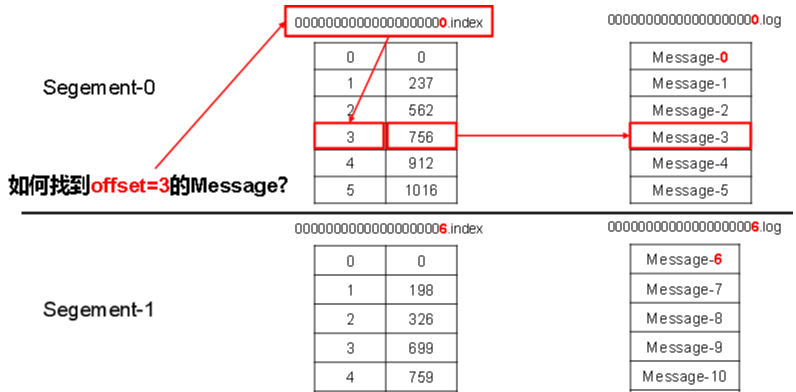
The .index file contains a large amount of index metadata, and the .log file contains the actual records. The index entries point to the physical byte position of a message in the corresponding log file.
Producer behavior: how Kafka decides partitions
Why partitioning exists
Kafka partitions data for two main reasons:
- It makes scaling easier. Each partition can be placed and adjusted according to the machine that stores it, and a topic can be composed of many partitions, allowing the cluster to handle very large datasets.
- It improves concurrency. Reads and writes happen at the partition level, so multiple producers and consumers can work in parallel.
Partition selection rules
Before a producer sends data, it packages the message into a ProducerRecord.

Kafka then decides the target partition using these rules:
- If a partition is explicitly specified, Kafka uses that partition directly.
- If no partition is specified but a key is present, Kafka hashes the key and takes the result modulo the number of partitions in the topic.
- If neither partition nor key is provided, Kafka generates a random integer on the first call, increments it on later calls, and takes the result modulo the number of available partitions. This is the commonly described round-robin approach.
How Kafka approaches reliability on the producer side
To make sure produced data reaches the intended topic partition reliably, the producer relies on acknowledgements from the broker. After a partition receives data, it sends back an ack. If the producer receives that ack, it continues with the next send; otherwise, it retries.
Replica synchronization strategy
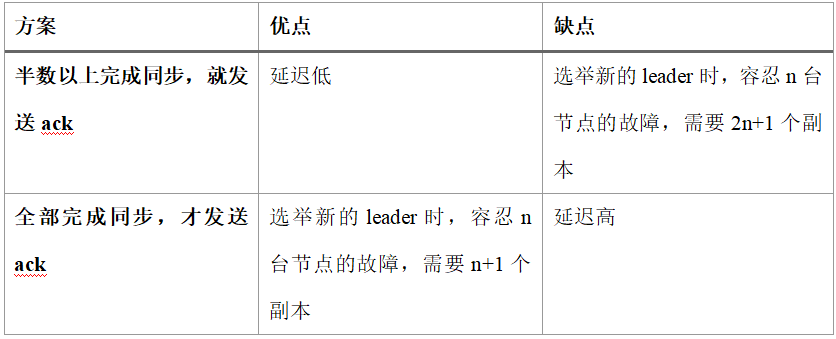
Kafka adopts the second synchronization strategy shown above, mainly for two reasons:
- To tolerate failures of
nnodes, the first strategy requires2n+1replicas, while the second only needsn+1. Since each partition may hold a large amount of data, the first option would create much heavier redundancy. - The second strategy may increase network latency, but network latency has relatively limited impact on Kafka.
ISR: the in-sync replica set
Using the second strategy raises an obvious problem. Suppose the leader has received the data and all followers begin synchronization, but one follower becomes slow or faulty and cannot keep up with the leader. If the leader waits forever, acknowledgements stall.
Kafka addresses this with the ISR (in-sync replica set), a dynamic set maintained by the leader. It contains the follower replicas that are currently keeping up with the leader.
Once the followers in the ISR finish synchronizing the data, the leader proceeds with the acknowledgement flow. If a follower fails to stay synchronized with the leader for too long, it is removed from the ISR. The threshold is controlled by the replica.lag.time.max.ms parameter.
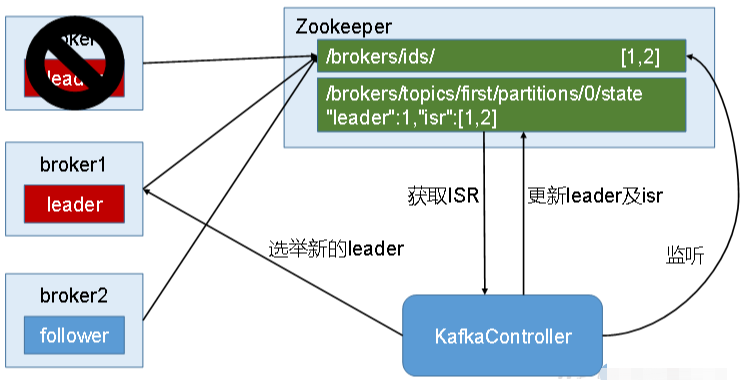
If the leader fails, Kafka elects a new leader from the ISR.
The acks setting and what it really means
Not all data requires the same durability. Some workloads can tolerate a small amount of loss in exchange for lower latency, so Kafka exposes several acknowledgement levels.
acks parameter options:
-
acks=0
The producer does not wait for any broker ack. This gives the lowest latency. The broker may return immediately after receiving the request, even before writing to disk. If the broker fails, data may be lost. -
acks=1
The producer waits for the leader of the partition to acknowledge after writing the record locally. If the leader fails before followers finish synchronization, data will be lost.
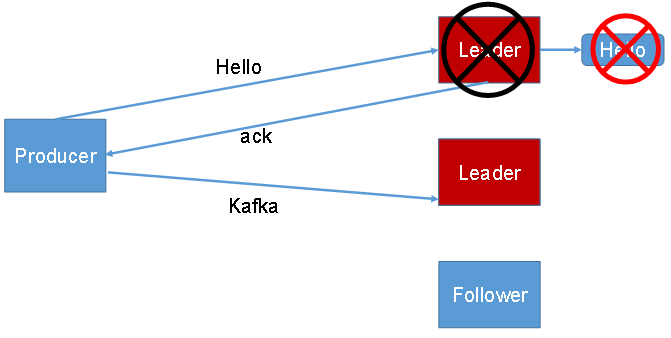
acks=-1(orall)
The producer waits until both the leader and followers have written the data successfully before the broker returns an ack. However, if the leader fails after follower synchronization completes but before the ack reaches the producer, duplicate data may occur.
Failure handling details
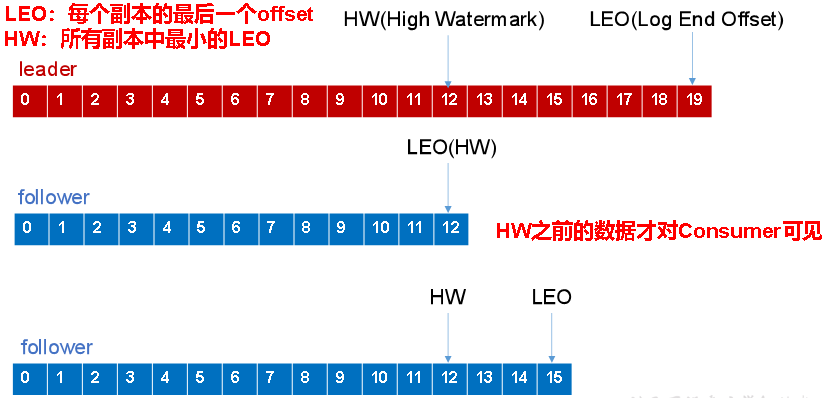
When a follower fails
A failed follower is temporarily removed from the ISR. After it recovers, it reads the last recorded HW from local disk, truncates any part of its log above that HW, and resumes synchronization from HW with the leader.
Once the follower’s LEO catches up so that it is greater than or equal to the partition’s HW, it is considered caught up and can rejoin the ISR.
When the leader fails
If the leader crashes, Kafka elects a new leader from the ISR. To keep replica data consistent, the remaining followers first truncate the portion of their logs above HW, then begin syncing from the new leader.
This process can preserve consistency among replicas, but it still does not guarantee that data will never be lost or duplicated.
Kafka consumers: pull-based consumption and partition assignment
Why Kafka uses pull instead of push
Kafka consumers read data from brokers using a pull model.
A push model is difficult to adapt to consumers with different processing speeds, because the broker controls the delivery rate. The goal is to push messages as fast as possible, but that can easily overwhelm consumers and lead to denial of service or network congestion.
A pull model lets each consumer fetch data at a rate it can actually handle.
The downside is that when Kafka has no data available, a consumer may keep polling and repeatedly receive empty results. To reduce this problem, Kafka consumers pass a timeout when fetching data. If no data is currently available, the consumer waits for a period before returning; that wait period is the timeout.
Partition assignment in a consumer group
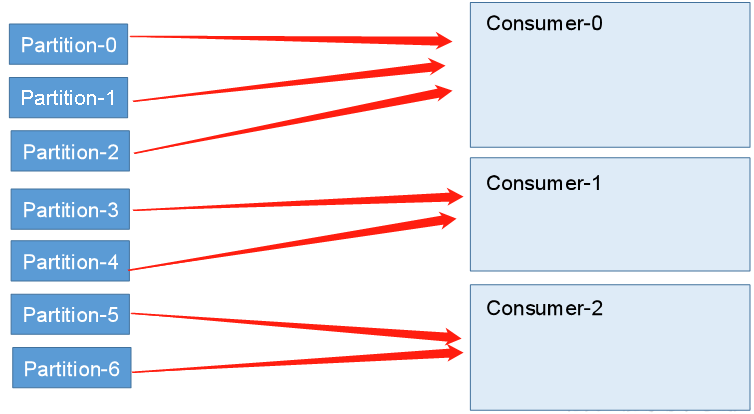
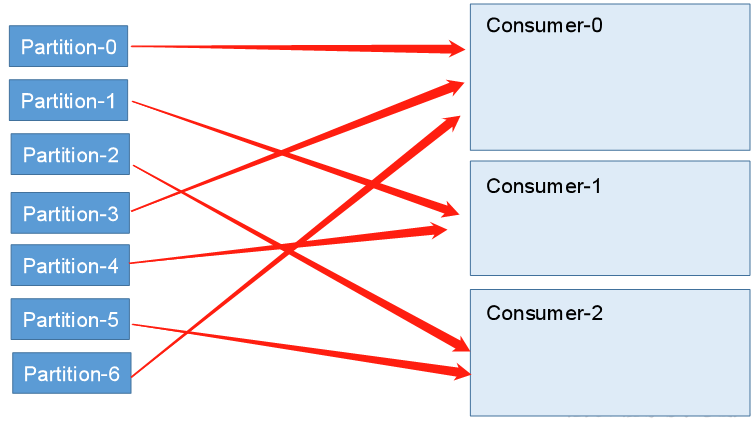
A consumer group may contain multiple consumers, and a topic may contain multiple partitions, so Kafka must decide which consumer reads which partition.
Kafka provides two partition assignment strategies:
- RoundRobin
- Range
RoundRobin
Range
Offset tracking
Consumers can fail at any time because of crashes, power loss, or process interruptions. After recovery, they need to continue from the previous position instead of starting from the beginning. That means Kafka must keep track of the offset each consumer has already processed.
Before Kafka 0.9, consumer offsets were stored in ZooKeeper by default. Starting with Kafka 0.9, offsets are stored by default in Kafka itself, in the internal topic __consumer_offsets.
Why Kafka can read and write so efficiently
Sequential disk writes
Producer data is written into partition log files by continuously appending to the end of the file. This is sequential I/O.
According to the official figures referenced in the original explanation, on the same disk, sequential writes can reach 600M/s, while random writes are only about 100k/s. The reason lies in the mechanical structure of disks: sequential writes avoid large amounts of disk head seeking.
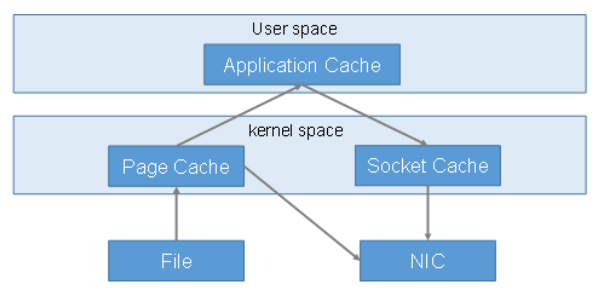
Zero-copy
Kafka also improves performance with zero-copy techniques.
What ZooKeeper does in a Kafka cluster
In a Kafka cluster, one broker is elected as the Controller. The Controller is responsible for cluster-level management tasks such as:
- tracking broker joins and departures
- managing partition replica assignments for topics
- handling leader elections
These management responsibilities depend on ZooKeeper.
The following diagram illustrates the leader election process for a partition: