GB/T 28181 is built on SIP, and a small experiment does not require a full video platform. The setup here uses IP direct connection: a simulated SIP server (UAS) accepts the Hikvision camera registration and heartbeats; a simulated SIP client (UAC) sends an INVITE to the camera IP; and a UDP listener on the client side receives the PS stream the camera pushes.
Useful background: - Basic SIP concepts. - Sending and receiving UDP packets in a general-purpose language. - Reading GB/T 28181-2016.
Some terms: - SIP defines a call setup flow; GB/T 28181 builds on SIP and adds its own rules. - Through GB/T 28181 you can control monitoring devices that support the same standard, such as IP cameras and NVRs. - A Hikvision network camera must be connected to a SIP server and keep sending heartbeats. If it does not, the PS stream it pushes will stop.
Test setup: - IP camera (IPC): 192.168.42.128 - Server (UAS): 192.168.3.189 - Client (UAC): 192.168.103.232
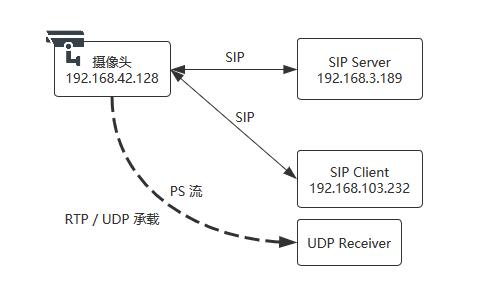
Main steps: 1. Write a simulated SIP server that answers registration and heartbeat requests. 2. Enable GB/T 28181 on the Hikvision IPC, fill in the SIP server settings, and set the IP whitelist. 3. Start a program that listens on a UDP port for data returned by the IPC. 4. Write a SIP client that sends an INVITE to the IPC and responds to the SIP messages coming back.
Simulated SIP server
This part is based on Pjsua2. The Pjsip/Pjsua2 environment has to be built first. According to the GB/T 28181 flow, a SIP server should authenticate a device before allowing registration. For this test that step can be skipped: return success for registration and also for heartbeats.
static pj_bool_t default_mod_on_rx_request(pjsip_rx_data *rdata)
{
  pjsip_tx_data *tdata;
  // Check whether the incoming request is REGISTER and handle it accordingly
  if (pjsip_method_cmp(&rdata->msg_info.msg->line.req.method, &pjsip_register_method) == 0)
  {
    // Parse authentication request
    // aregistrar(rdata);
    PJ_LOG(3, (THIS_FILE, "REGISTRATAR\n\n\n"));
    pjsip_endpt_create_response(pjsua_get_pjsip_endpt(), rdata, 200, NULL, &tdata);
    pjsip_endpt_send_response2(pjsua_get_pjsip_endpt(), rdata, tdata, NULL, NULL);
    return PJ_TRUE;
  }
  // For other cases such as heartbeat, return 200 OK directly
  pjsip_endpt_create_response(pjsua_get_pjsip_endpt(), rdata, 200, NULL, &tdata);
  pjsip_endpt_send_response2(pjsua_get_pjsip_endpt(), rdata, tdata, NULL, NULL);
  return PJ_TRUE;
}
Generate the Makefile from server.pro with qmake:
qmake -o Makefile server.pro
Start the service with:
./server
The authentication algorithm is not used in this test, but the calculation looks like this:
# === pseudocode ===
username = "34020000001110000001"
passed   = "12345678"
realm    = "34020000"
nonce    = "awer23sdfj123123"
uri      = "sip:192.168.103.245"
Method   = "REGISTER"

# HA1=MD5(username:realm:passwd)
HA1 = MD5(34020000001110000001:34020000:12345678)
# HA2 = MD5(Method:Uri)
HA2 = MD5(REGISTER:sip:192.168.103.245)

HA1 = d4a15a944c6af0405cc244114fea3da0
HA2 = 948e32c0c2723059c74f8392c1f9e4db
# response = MD5(d4a15a944c6af0405cc244114fea3da0:awer23sdfj123123:948e32c0c2723059c74f8392c1f9e4db)

# Final response value
response = 3d988c33c15d780273d74577a6a3319e
Configure the Hikvision camera
Open the Hikvision camera configuration page.
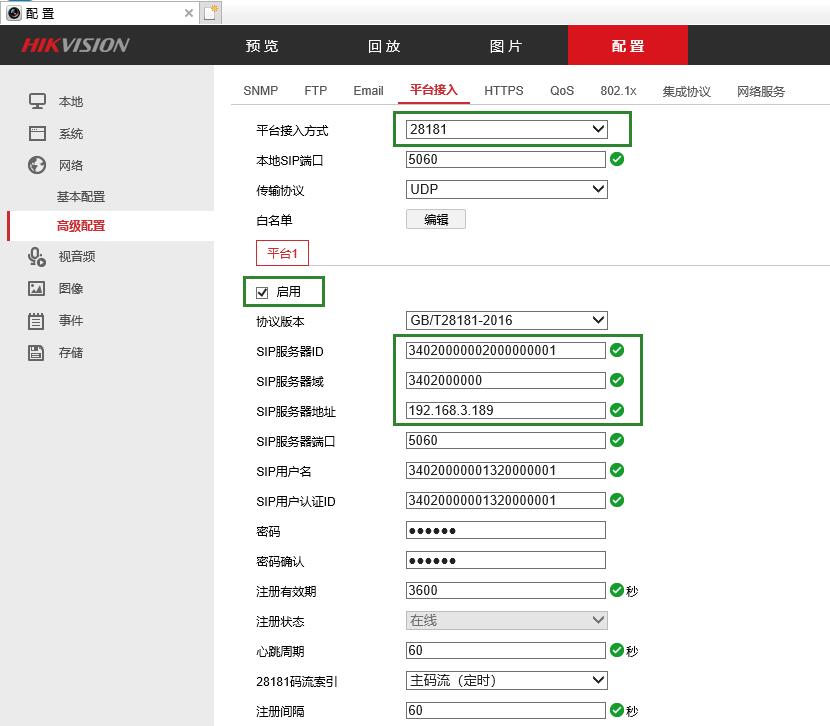
Enable GB/T 28181 platform access. The SIP server ID is the SIP user URI; the address is the IP running the simulated SIP server. After a short wait, the registration status should change to Online.
In the terminal logs you can see the registration and heartbeat packets.
Registration and reply:
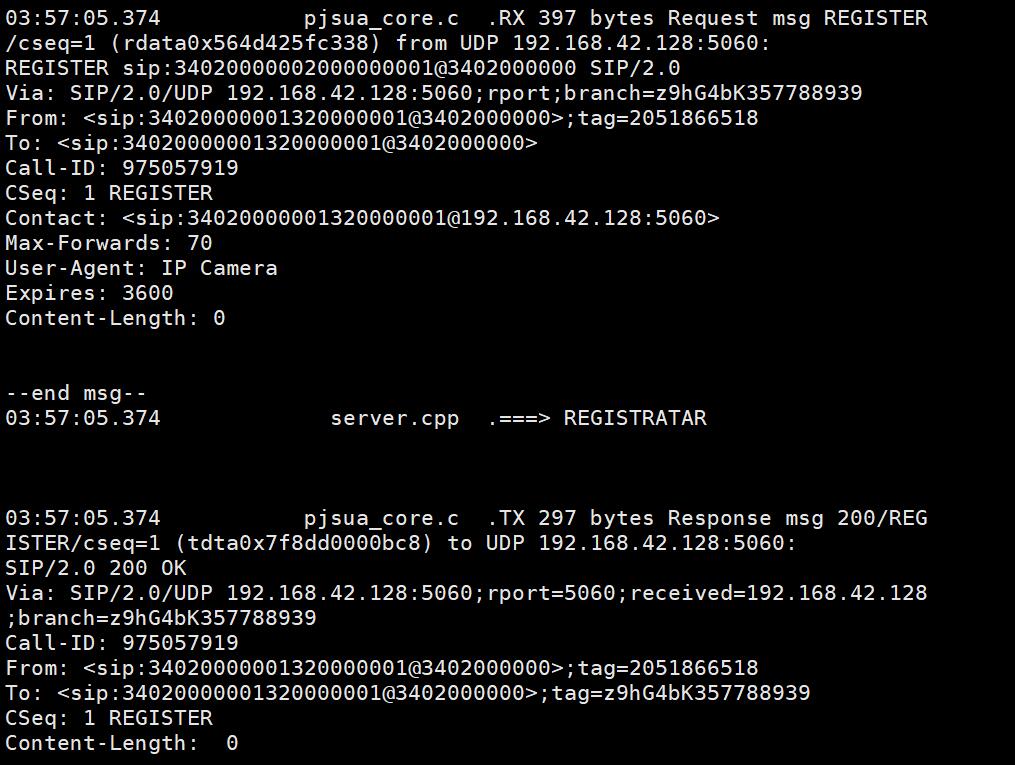
Heartbeat and reply:
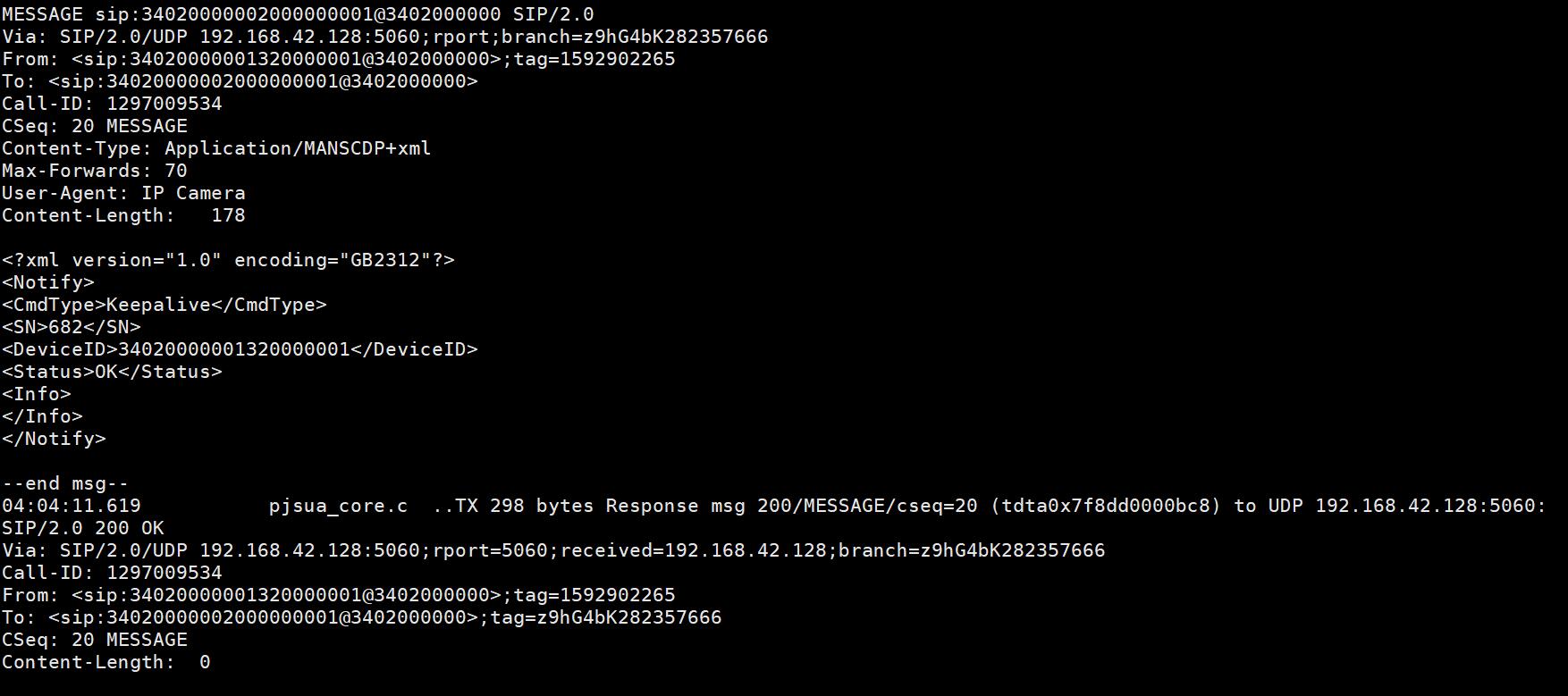
At this point the Hikvision camera is connected to the simulated GB/T 28181 platform.
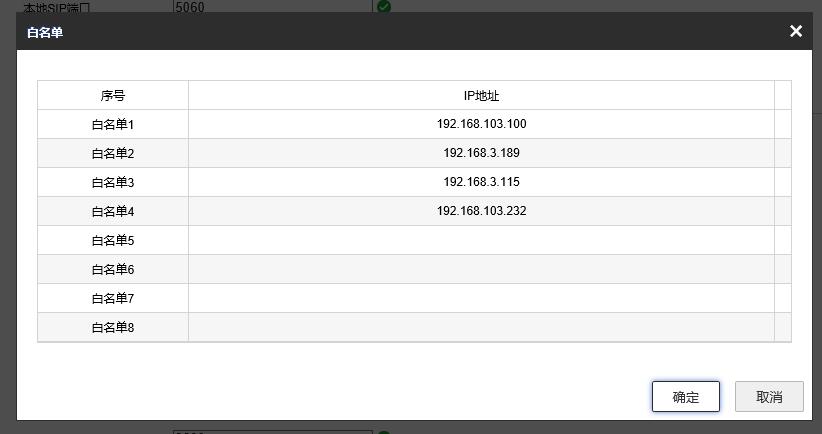
Do not forget the whitelist. Add the SIP client IP address; otherwise the camera will not answer the INVITE request.
Start the UDP listener
On the client, start a program that listens on the local IP and port 6000, then prints whatever it receives. The port is specified in the upcoming request: 6000/udp is where the PS stream data is expected.
SIP client and camera exchange
The flow is:
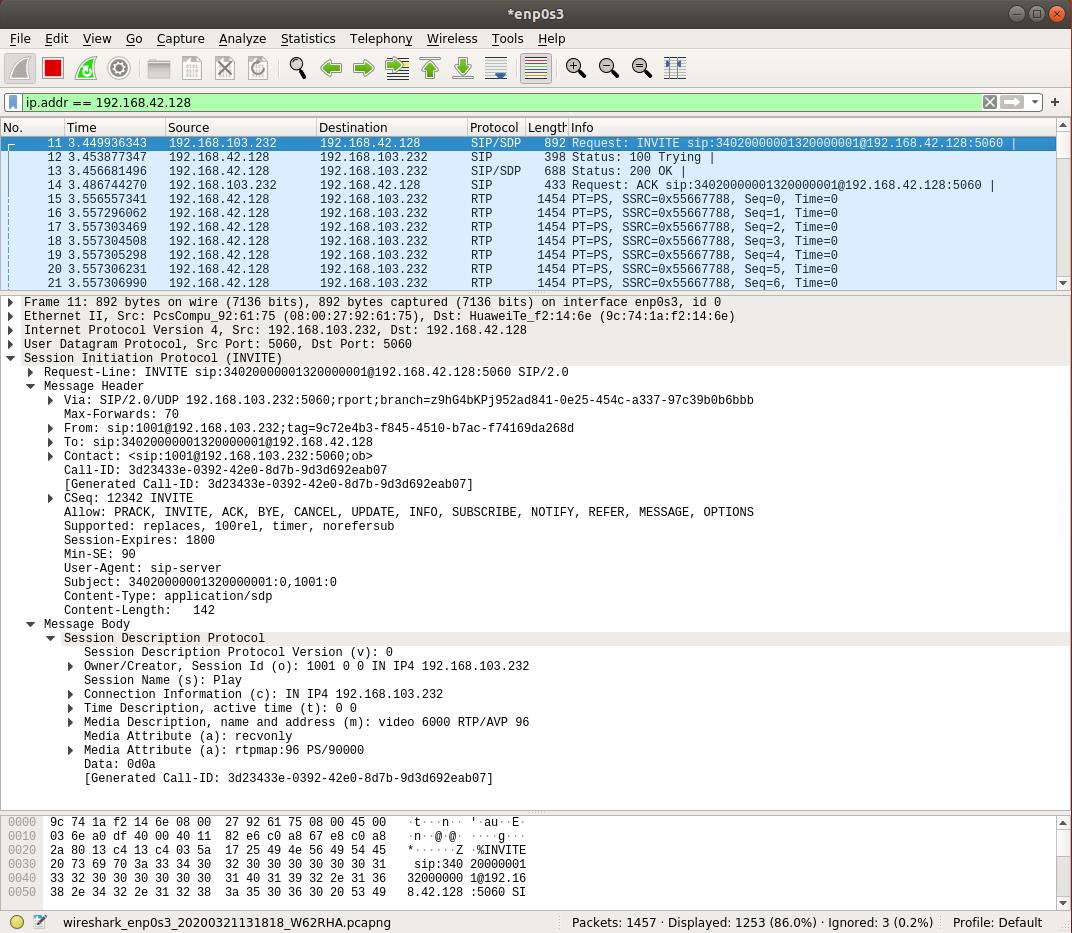
1) The client sends INVITE:
INVITE sip:[email protected]:5060 SIP/2.0
Via: SIP/2.0/UDP 192.168.103.232:5060;rport;branch=z9hG4bKPj952ad841-0e25-454c-a337-97c39b0b6bbb
Max-Forwards: 70
From: sip:[email protected];tag=9c72e4b3-f845-4510-b7ac-f74169da268d
To: sip:[email protected]
Contact: <sip:[email protected]:5060;ob>
Call-ID: 3d23433e-0392-42e0-8d7b-9d3d692eab07
CSeq: 12342 INVITE
Allow: PRACK, INVITE, ACK, BYE, CANCEL, UPDATE, INFO, SUBSCRIBE, NOTIFY, REFER, MESSAGE, OPTIONS
Supported: replaces, 100rel, timer, norefersub
Session-Expires: 1800
Min-SE: 90
User-Agent: sip-client
Subject: 34020000001320000001:0,1001:0
Content-Type: application/sdp
Content-Length:   142

v=0
o=1001 0 0 IN IP4 192.168.103.232
s=Play
c=IN IP4 192.168.103.232
t=0 0
m=video 6000 RTP/AVP 96
a=recvonly
a=rtpmap:96 PS/90000
Points to watch: - The tag under From must be generated dynamically, and later responses use the same tag. - The client username and ID are 1001 here; the value is arbitrary. - The Subject header is required. Its form is camera channel ID:channel number,caller SIP ID:channel number. - The IP address in SDP indicates the receiving address, and port 6000 under m is where data is received. - The media type is 96, PS/90000.
2) The IPC returns Trying:
SIP/2.0 100 Trying
Via: SIP/2.0/UDP 192.168.103.232:5060;rport=5060;branch=z9hG4bKPj952ad841-0e25-454c-a337-97c39b0b6bbb
From: <sip:[email protected]>;tag=9c72e4b3-f845-4510-b7ac-f74169da268d
To: <sip:[email protected]>
Call-ID: 3d23433e-0392-42e0-8d7b-9d3d692eab07
CSeq: 12342 INVITE
User-Agent: IP Camera
Content-Length: 0
3) The IPC then returns 200 OK:
SIP/2.0 200 OK
Via: SIP/2.0/UDP 192.168.103.232:5060;rport=5060;branch=z9hG4bKPj952ad841-0e25-454c-a337-97c39b0b6bbb
From: <sip:[email protected]>;tag=9c72e4b3-f845-4510-b7ac-f74169da268d
To: <sip:[email protected]>;tag=38473588
Call-ID: 3d23433e-0392-42e0-8d7b-9d3d692eab07
CSeq: 12342 INVITE
Contact: <sip:[email protected]:5060>
Content-Type: application/sdp
User-Agent: IP Camera
Content-Length:   189

v=0
o=34020000001320000001 208 208 IN IP4 192.168.42.128
s=Play
c=IN IP4 192.168.42.128
t=0 0
m=video 15060 RTP/AVP 96
a=setup:active
a=sendonly
a=rtpmap:96 PS/90000
a=filesize:0
One detail: the tag in the To field must be carried when answering with ACK or BYE.
4) The SIP client sends ACK:
ACK sip:[email protected]:5060 SIP/2.0
Via: SIP/2.0/UDP 192.168.103.232:5060;rport;branch=z9hG4bKPj4926c10e-b480-4cb0-a520-fdbf694c5f9e
Max-Forwards: 70
From: sip:[email protected];tag=9c72e4b3-f845-4510-b7ac-f74169da268d
To: sip:[email protected];tag=38473588
Call-ID: 3d23433e-0392-42e0-8d7b-9d3d692eab07
CSeq: 12343 ACK
Content-Length:  0
After that, the IP camera starts pushing RTP-carried PS stream data.
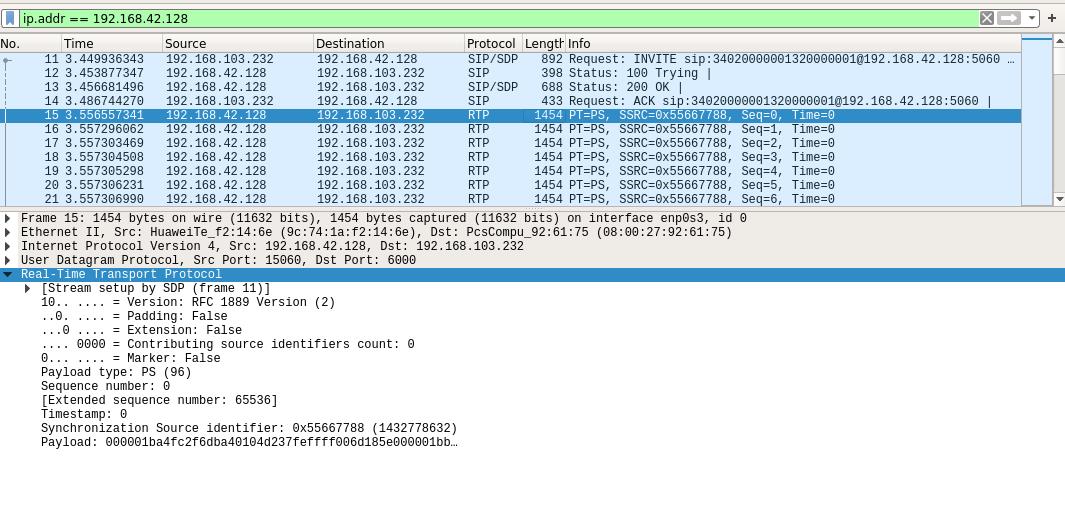
The program listening on port 6000 should now show a continuous stream of data.
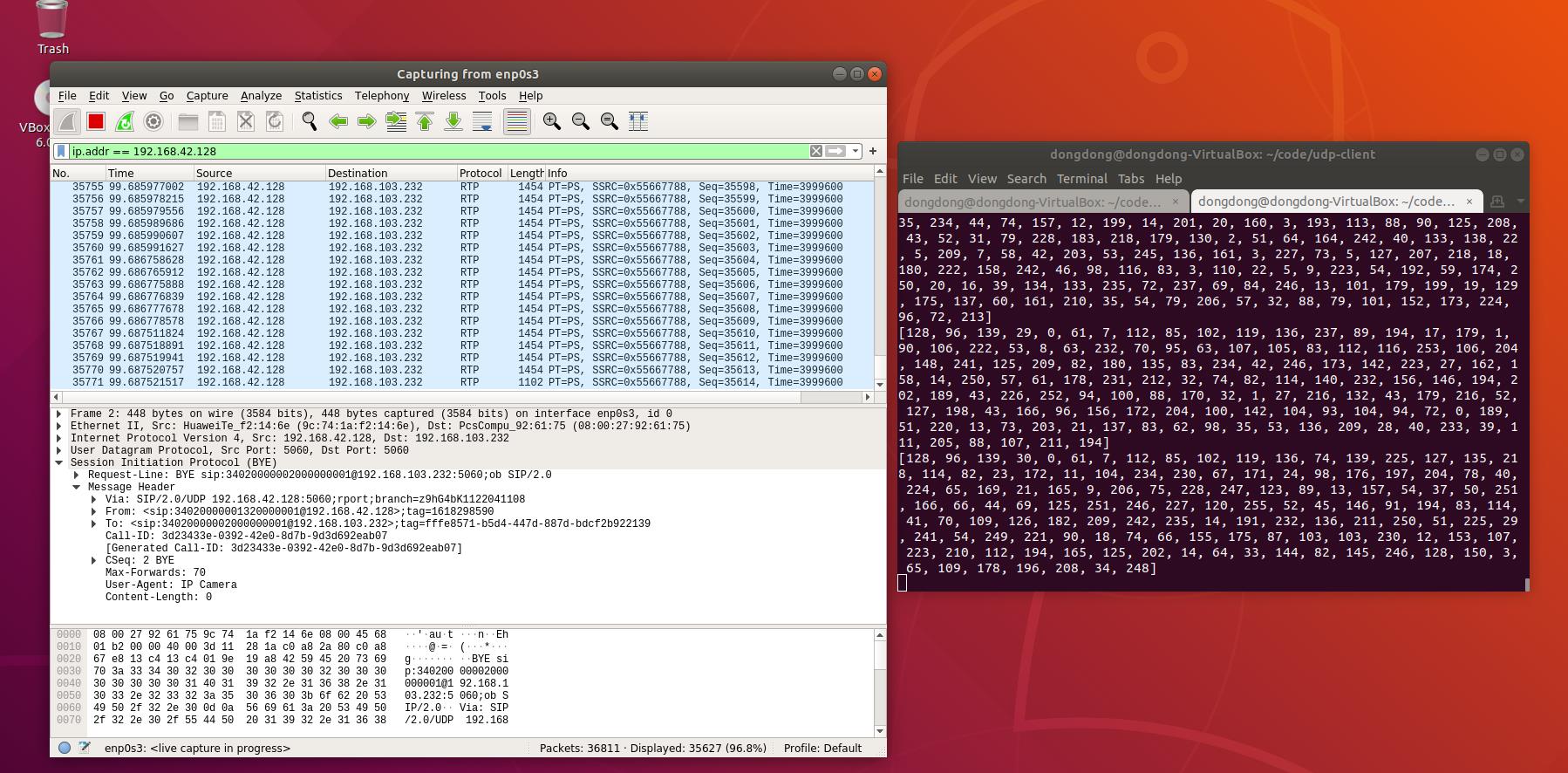
Other points: - The IPC must remain registered with SIP and keep sending heartbeats. Otherwise the stream stops after a few seconds. - If the UDP port is not listening, Wireshark shows a warning from the IPC followed by a BYE.
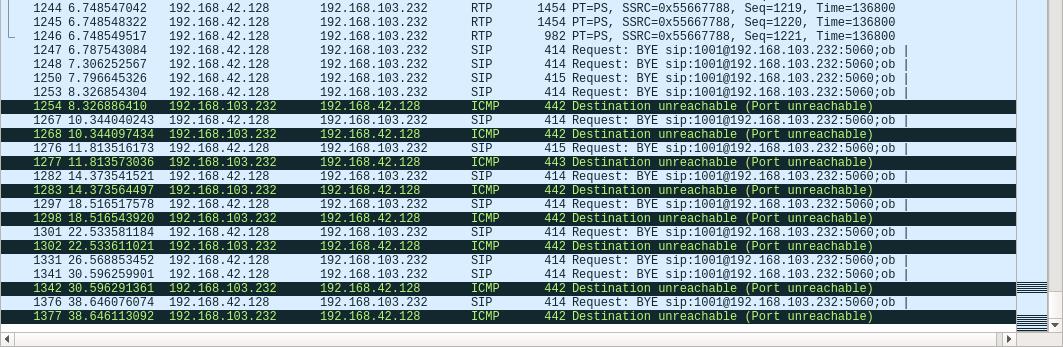
The SIP client itself is simple: assemble the strings and send them over UDP. It does not matter whether this is done in Rust, Python, or another language. If Wireshark shows the same flow and the same returned messages, the implementation is working.
Wireshark is worth using heavily here. A single wrong byte in a lower-level packet can change what the message means.
Writing a SIP client or SIP server by hand is convenient for small functions and quick checks. Once the feature set grows, development should move to Pjsip/Pjsua2. The library has a large number of functions and the documentation is not especially friendly.
This example has the SIP client connect directly to the IPC to get the PS stream. In the normal GB/T 28181 flow, the SIP client sends the request to the SIP server, the server acts as a back-to-back proxy, and the data follows afterward. Because the SIP server here is simulated and lacks many functions, the client sends its request straight to the IPC. That shortcut is what keeps the experiment small enough to inspect packet by packet.