A recent discussion in a developer group brought me back to a familiar topic: indie game development. Someone shared a post by an indie developer whose views felt very close to mine. Years ago, during the big Unity3D wave in China, many developers gathered in communities like GameManNiu; that whole era has already become a bit of history.
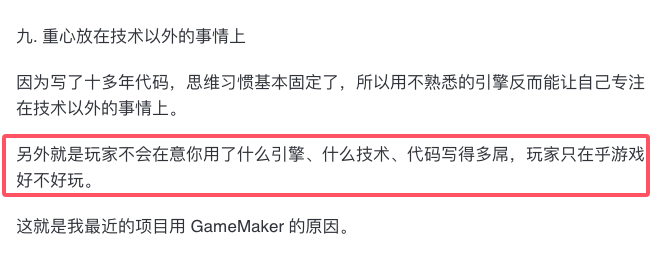
One point in that post stood out to me, because it matches how many small developers tend to think: we are, above all, pragmatists.
Everyone Wants to Be an Indie Developer
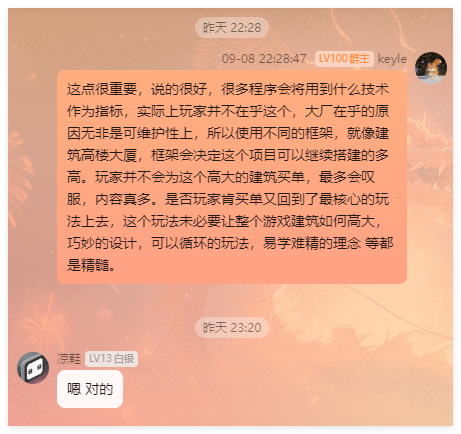
A lot of programmers struggle with the same problem when thinking about making their own games. Client-side developers, in particular, often approach work differently from game designers. Their thinking can easily become trapped by technical boundaries: what can be implemented, what technology is being used, what system looks impressive.
But if you focus too much on the technology currently used in a game, the actual gameplay often gets weakened. Players do not pay for clever technical tricks. They pay for games that are fun. A game with high technical complexity is not automatically a good game.
Recently I have looked at quite a few open-source projects, and many of them are tool-oriented. Tools are easier to define. When building a tool, you can usually narrow the scope to a small, specific problem: this feature solves this exact need, and the boundary is clear.
Games are different. The subject is too open-ended, which is one reason they are hard to make. At the beginning of a game project, it is difficult to place a neat boundary around the world you want to describe.
For example, if you say you want to make an RPG, you may start by describing the background story. After writing the story, you then work backward and decide which part of it should become the core gameplay. Or you can reverse the process: define the core gameplay first, then attach a background setting to it. In practice, the second approach is often easier.
Where Gameplay Comes From
Gameplay usually begins with a prototype. Find a game whose gameplay you want to make, reproduce that core loop as closely as possible, and then expand it through your own imagination. You can change the rules, add mechanics, remove mechanics, or adjust the structure. The only real goal is to make the gameplay better.
A useful method is to find several reference games and read the player comments. The feedback left by players is often more valuable than abstract design theory, because it points directly to what people felt was missing, frustrating, or worth improving.
There is no such thing as 100% originality, just as your name is probably not the only one in the world. Most design is addition and subtraction, and sometimes multiplication.
Multiplication means combining several types of gameplay into one. But combination is not the same as simple stacking. If you merely place several mechanics side by side, the result becomes a collection of mini-games. That is obviously not what an indie game should aim for.
The Development Order Can Be Split Apart
This is an important issue, important enough to affect perhaps half of the total development time. The following is only a personal view, and there is plenty of room for discussion.
When the team is small, or when there is only one person, letting development wait for art assets, searching for resources, or slowly debugging shaders can cause a single feature to take far longer than expected. The more detailed the work, the more time it consumes. Because of that, some of this work should be moved to a later stage.
Development Plan A
In this approach, every completed feature in the early stage is paired with matching visual presentation. Each time a feature is finished, its art and effects are adjusted as well.
Suppose five features are completed. After adjusting the visuals five separate times, you may discover that the results do not look harmonious together, so the earlier work needs to be adjusted again.
The advantage of Plan A appears when there is enough budget. Function and presentation can be separated and handled by two people. The person responsible for presentation focuses on unifying the style and improving the look, while the developer focuses on feature logic.
Development Plan B
In this approach, the early stage avoids full visual polish. After completing a number of features, you keep only the most basic indicators or placeholders.
Once several features form a module, you then begin the graphical work and enrich the presentation in a more unified way.
The advantage of Plan B is obvious when the budget is limited. Finish the overall functional structure first, then iterate on art later. This can compress the schedule further.
And since we are talking about indie game development, we are usually talking about fighting a battle without much money. In that situation, Plan A is often not realistic.
A Few Useful Resources
Tripo AI
Tripo AI is an online 3D modeling platform released by VAST. It can generate high-quality, ready-to-use 3D models from text or images within seconds. It gives users a fast and simple way to create 3D assets without requiring complex modeling skills or professional modeling software.
At present, Tripo AI supports text-to-3D and image-to-3D. Texture mapping is planned as a later feature. The general-purpose 3D large model behind the product, Tripo, was completed in December 2023. It was trained on a large-scale native 3D database and is described as a 3D model with billions of parameters.
Tripo can currently generate a textured 3D mesh model in about 8 seconds, and the output can enter a traditional production pipeline for further editing and adjustment. On top of that, an additional 5 minutes of optimization can bring the model closer to the quality of human-made 3D assets, with a claimed success rate of over 95%.
Main functions of Tripo AI:
- Text to 3D: generate a 3D model from a text description.
- Image to 3D: convert an image into a 3D model.
- Texture mapping: add textures to 3D models.
Pricing
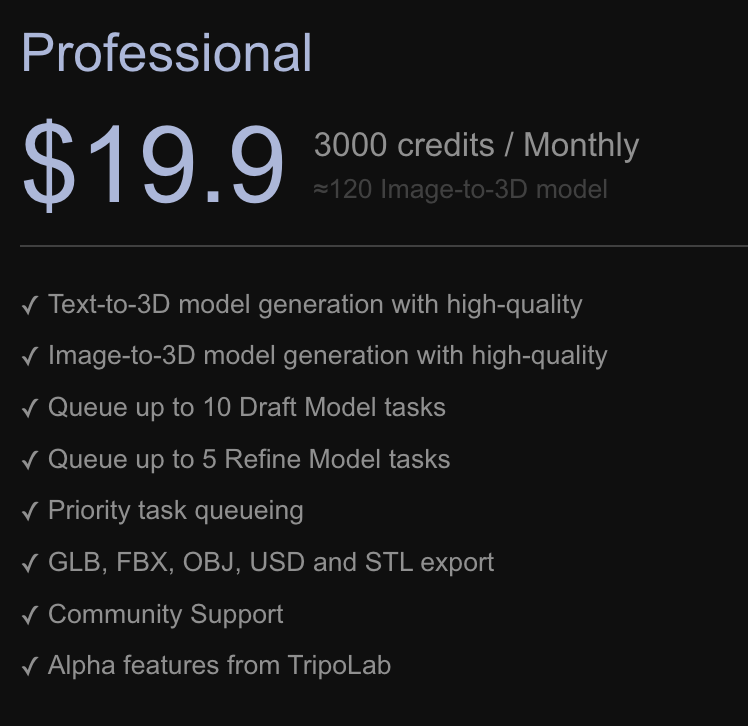
https://www.tripo3d.ai/
Mixamo
If you already have a model and texture files, Mixamo can be used for T-pose rigging, and it provides a large number of compatible animations.
Main functions of Mixamo:
- Ready-made characters: it provides a library of high-quality 3D characters, ranging from realistic to cartoon styles. The characters are already textured and rigged.
- Automatic character rigging: after uploading a custom 3D character, it can automatically bind a full humanoid skeleton to the model.
- Motion capture animations: thousands of full-body character animations captured from professional motion actors.
- Export options: downloads are available in multiple formats.